Advanced Issues Generation | Smart Data Generator Documentation
Advanced Issues Generation documentation.
Overview
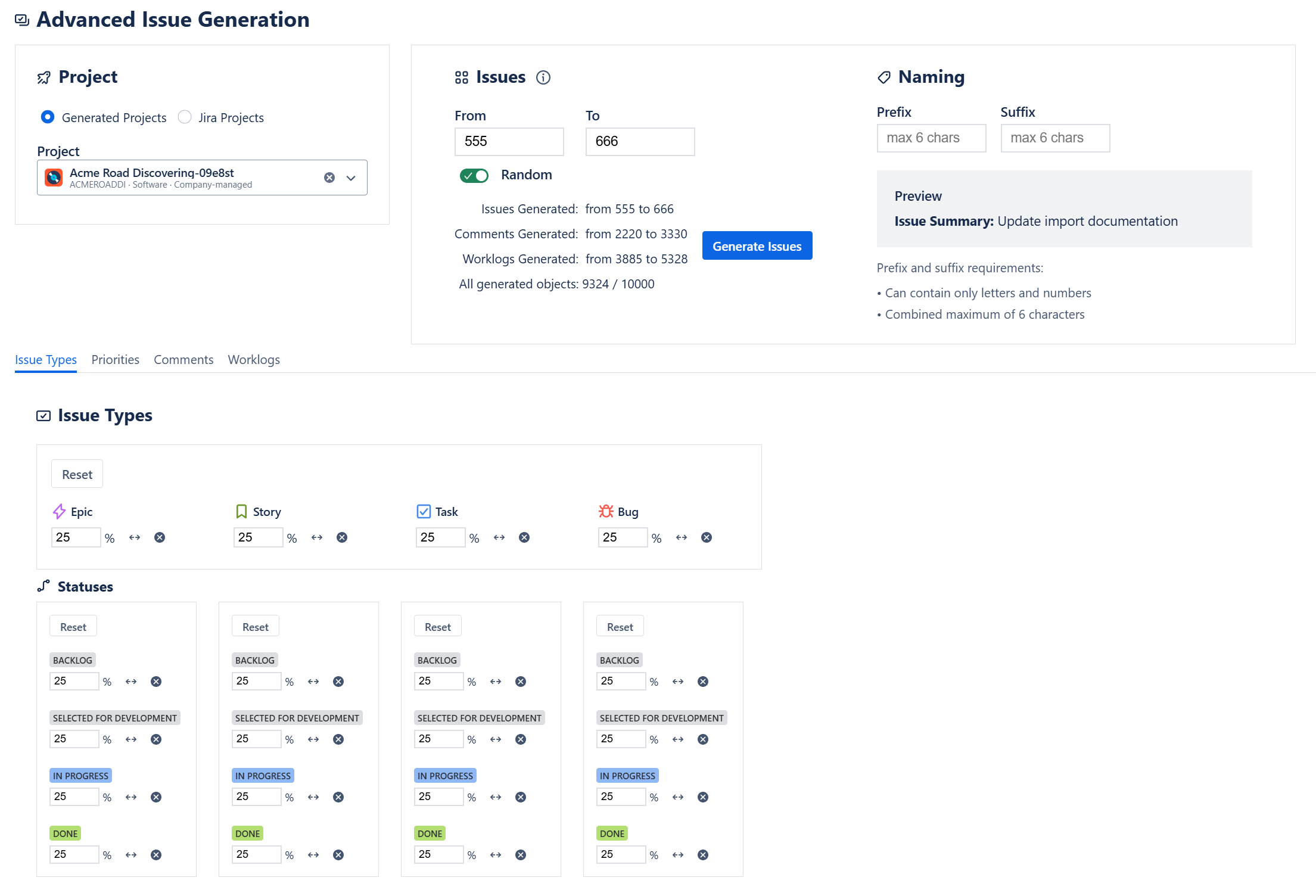
The Advanced Issues Generation module provides a highly configurable way to create realistic, well-balanced issue sets inside a single target project.
It is designed for environments where issue distribution accuracy matters—for example, performance testing, reporting validation, workflow analysis, or migration rehearsals.
Users can control the number of generated issues, their distribution by type, status, and priority, as well as optional comments and worklogs.
Project Selection
Advanced Issue Generation requires selecting exactly one project where all issues will be created.
To ensure clarity, projects are presented in two independent lists:
1. Existing Jira Projects
- Displays all standard Jira projects that the user has access to.
- Suitable for enriching preconfigured environments or test sandboxes.
2. Projects Generated by Smart Data Generator
- Displays only projects created through the application.
- Ensures full separation between synthetic and real environments.
The user must explicitly choose one project from one of these two groups before proceeding.
Issue Quantity Configuration
Users can define the total number of issues to generate within the selected project using:
- Fixed count, or
- Random range (min–max)
Limit
- A maximum of 1,000 issues may be generated in a single Advanced Issues Generation action.
Distribution Settings
Advanced Issue Generation allows defining proportional distributions for:
Issue Types
Example:
- 40% Story
- 40% Bug
- 20% Task
Status Distribution (Per Issue Type)
Status distribution is configured individually for each Issue Type.
This means that for every selected Issue Type, the user defines its own breakdown of statuses.
Example:
Story
- 50% To Do
- 30% In Progress
- 20% Done
Bug
- 20% To Do
- 60% In Progress
- 20% Done
Task
- 70% To Do
- 20% In Progress
- 10% Done
The generator applies these rules independently for each Issue Type, producing realistic multi-dimensional distributions.
Priorities
Example:
- 60% Medium
- 30% High
- 10% Low
The system automatically calculates and creates the correct number of issues matching all proportional definitions.
Comments Generation (Optional)
For each generated issue, the system may create comments.
Supported modes:
- Fixed number (e.g., 3 comments per issue)
- Random range (e.g., 1–5 comments per issue)
Limit
- Up to 10 comments per issue
Worklogs Generation (Optional)
Worklogs may also be generated for each issue.
Supported modes:
- Fixed number
- Random range
Worklog Parameters
- Duration: 1h to 80h
- Date Range: user selects a time window from which worklog timestamps will be generated
Limit
- Up to 10 worklogs per issue
Global Generation Limit
All generated entities count toward the total output for a single action:
Maximum total objects per Advanced Issues Generation action: 10,000
(issues + comments + worklogs combined)
If the configured parameters exceed this limit, the generator will warn the user before executing.
Additional Notes
- All limits apply regardless of project type.
- The generator evaluates distributions after applying the total issue count, ensuring correct proportional output.
- Comments and worklogs are created only after base issues are successfully generated.
- All generated items appear in Activity Stream and can be deleted via “Delete by Action.”