Boards Generation | Smart Data Generator Documentation
Boards Generation documentation.
Overview
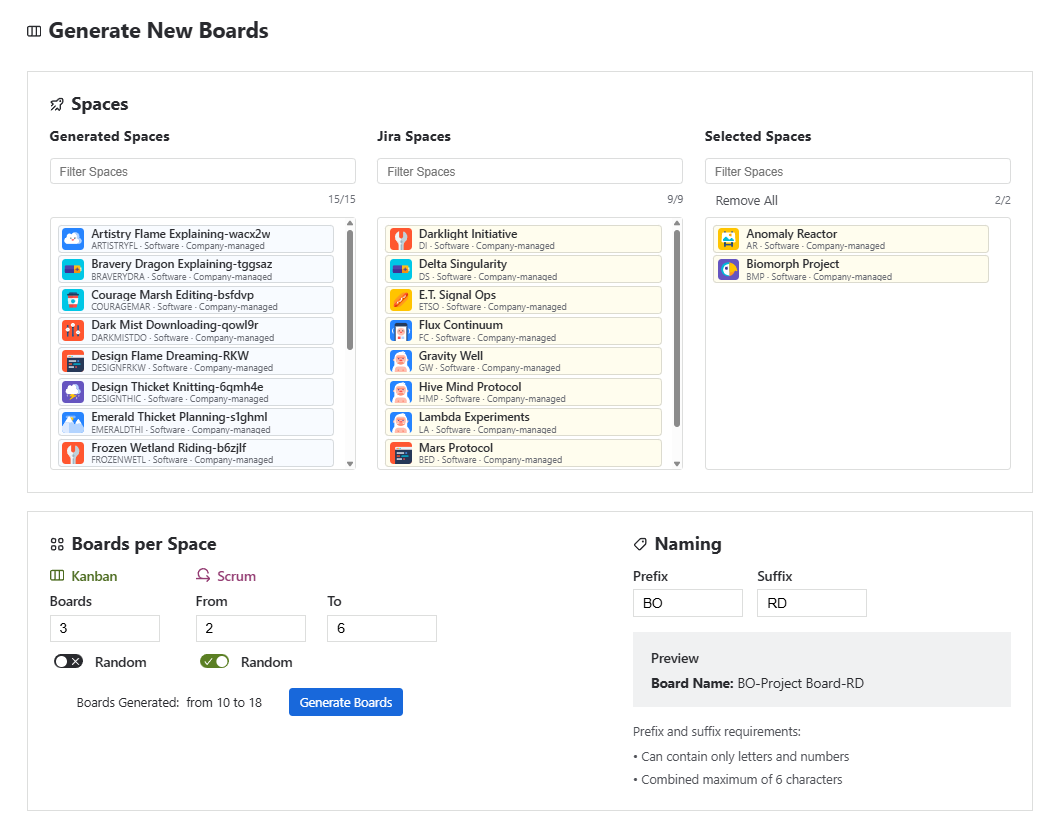
The Boards Creation module allows users to generate large volumes of Jira boards across one or multiple Jira spaces.
It supports Software Company-managed spaces only. Users can configure the number of Kanban and Scrum boards to generate, as well as optional naming rules applied to all generated boards.
This module is ideal for demos, testing, performance validation, reporting scenarios, and onboarding simulations.
Space Selection
Users can choose where boards should be generated from the available Jira spaces.
Only spaces that meet the following requirements are supported:
- Company-managed spaces
- Software space type
Spaces that do not meet these requirements are not available for board generation.
Selection Limit
Users may select up to 20 spaces per generation action.
This limit helps ensure stable performance and predictable generation times across environments.
Board Quantity Configuration
For each selected spaces, you may choose how many boards to generate for each board type.
Fixed count
Generate exactly the specified number of boards for each selected spaces.
Example:
Generate exactly 20 Kanban boards and 10 Scrum boards for each space.
Random range
Generate a random number of boards within the specified range.
Example:
Generate 10–30 Kanban boards and 5–15 Scrum boards per space.
The number is randomized independently for each selected space, allowing you to create more natural distributions across environments.
Limits
- A single space may receive up to 50 Kanban boards
- A single space may receive up to 50 Scrum boards
Kanban and Scrum limits are applied independently, so up to 100 boards may be generated per space.
Naming Rules
Generated boards use predefined names provided by the application.
You may optionally apply:
- Prefix for the board name
Example:TRAIN-Space Board - Suffix for the board name
Example:Space Board-DEMO
Example final name:TRAIN-Space Board-DEMO
The configured prefix and suffix are applied to all generated boards.
Naming rules help distinguish generated boards from existing Jira boards.
Deleting Generated Boards
Smart Data Generator tracks the boards created during each generation action.
All boards created during a specific generation action can be removed through the Activity History using Delete Button.
Important: Board deletion is permanent and cannot be undone.
Additional Notes
- Only Company-managed Software spaces are supported
- Users may select up to 20 spacesper generation action
- Each space may receive up to 50 Kanban boards and 50 Scrum boards
- When random ranges are used, the number of boards is randomized independently for each space
- Users must have Browse Projects permission for the selected spaces; otherwise, those spaces will be skipped during generation
- Each space is processed independently during generation
- All generated boards appear in the Activity History, allowing removal via Delete by Action