Generate Sprints from Backlog | Smart Data Generator Documentation
Generate Sprints from Backlog documentation.
Overview
Generate Sprints is a backlog action that allows users to quickly create multiple Jira sprints using AI-generated suggestions or custom sprint names.
Instead of creating each sprint manually, users can generate a list of themed sprint names, review them, and create up to 50 sprints in a single action.
The Generate Sprints backlog action is available on all Jira boards that support sprints.
Generate Sprints is ideal for:
- Planning upcoming iterations
- Setting up new Scrum projects
- Organizing long-term release plans
- Standardizing sprint naming across teams
- Accelerating backlog planning
All created sprints are fully tracked in the Users Activity Stream and can be removed at any time.
How It Works
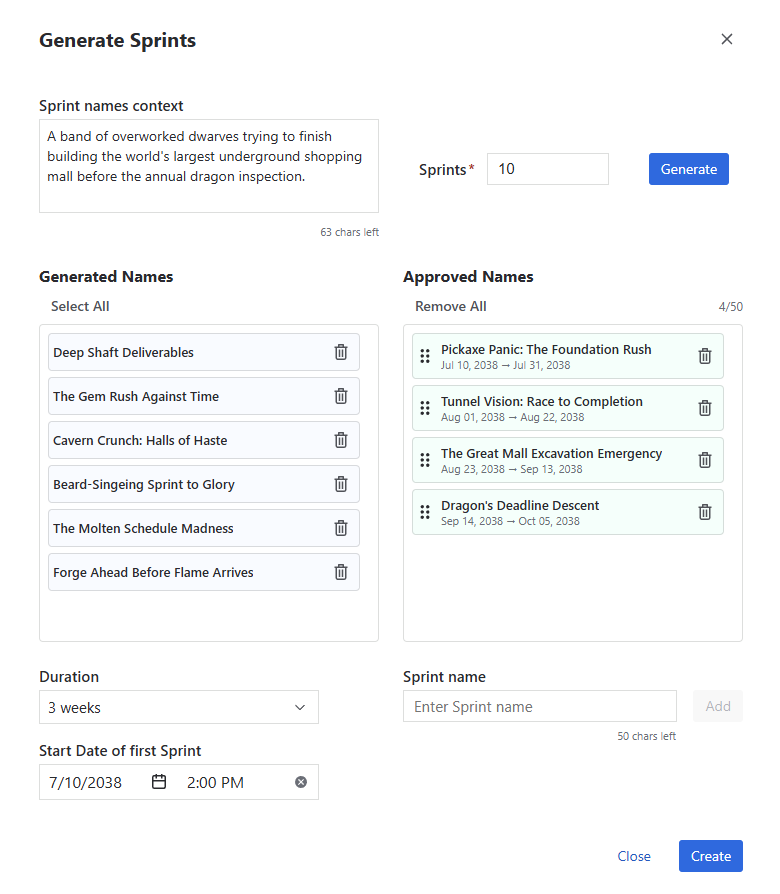
The Generate Sprints dialog provides an interactive workflow for creating multiple sprints.
Users can:
- enter an optional context to influence sprint name generation
- specify how many sprint names should be generated (up to 50)
- generate AI-powered sprint name suggestions
- review generated names
- remove unwanted suggestions
- manually add custom sprint names
- reorder approved sprint names using drag and drop
Optionally, users can also:
- select the sprint duration
- choose the start date and time of the first sprint
After clicking Create, all approved sprint names are created as consecutive Jira sprints.
 {.img-center .img-full}
Sprint Name Generation
Sprint names are generated using AI based on the optional context provided by the user.
The context helps AI generate names that match the desired theme and can describe virtually any business domain, project, product, release, team initiative, or organizational objective.
Generated names are suggestions only. Before creating the sprints, users can:
- accept generated names
- remove unwanted suggestions
- manually add new sprint names
- reorder sprint names using drag and drop
Sprint Scheduling
Optionally, users can automatically schedule the generated sprints by specifying:
- the duration of each sprint
- the start date and time of the first sprint
Every sprint uses the same duration.
The first sprint begins on the selected date and time. Each subsequent sprint starts 24 hours after the previous sprint ends, maintaining a one-day gap between consecutive sprints.
If scheduling information is not provided, sprints are created without predefined dates.
Limits
Generate Sprints applies the following limits.
Sprint Generation
- Up to 50 Sprint Name suggestions can be generated in a single action
- Maximum 50 Sprints can be created in a single action
- Sprint Names can contain up to 50 characters
- The generation context can contain up to 200 characters
AI Usage on Evaluation Licenses
Evaluation licenses include 50 AI sprint name generation prompts.
If you need a higher limit while evaluating Smart Data Generator, you can contact us through the Customer Portal. We can increase the AI generation limit for your evaluation license upon request.
Activity Stream Integration
Every Generate Sprints action is recorded in the Users Activity Stream.
Each activity entry includes:
- Action ID
- Action Type (Generate Sprints from Backlog)
- Performed By
- Date
- Duration
- Number of sprints created
- Status
Users can review previous generation actions and remove all created sprints directly from the Activity Stream.
Permissions
To generate sprints, users must have permission to manage sprints on the selected Jira board.
Additional Notes
- Generate Sprints is available only for instances with an active Smart Data Generator license
- Generate Sprints is available only on Jira boards that support sprints
- AI generates sprint name suggestions only - users always decide which sprints are created
- Generated and manually added sprint names can be combined in a single action
- Sprint order can be changed before creation using drag and drop
- When scheduling is enabled, sprint dates are calculated automatically
- Created sprints behave exactly like standard Jira sprints and are available in the backlog