Issues Creation | Smart Data Generator Documentation
Issues Creation documentation.
Overview
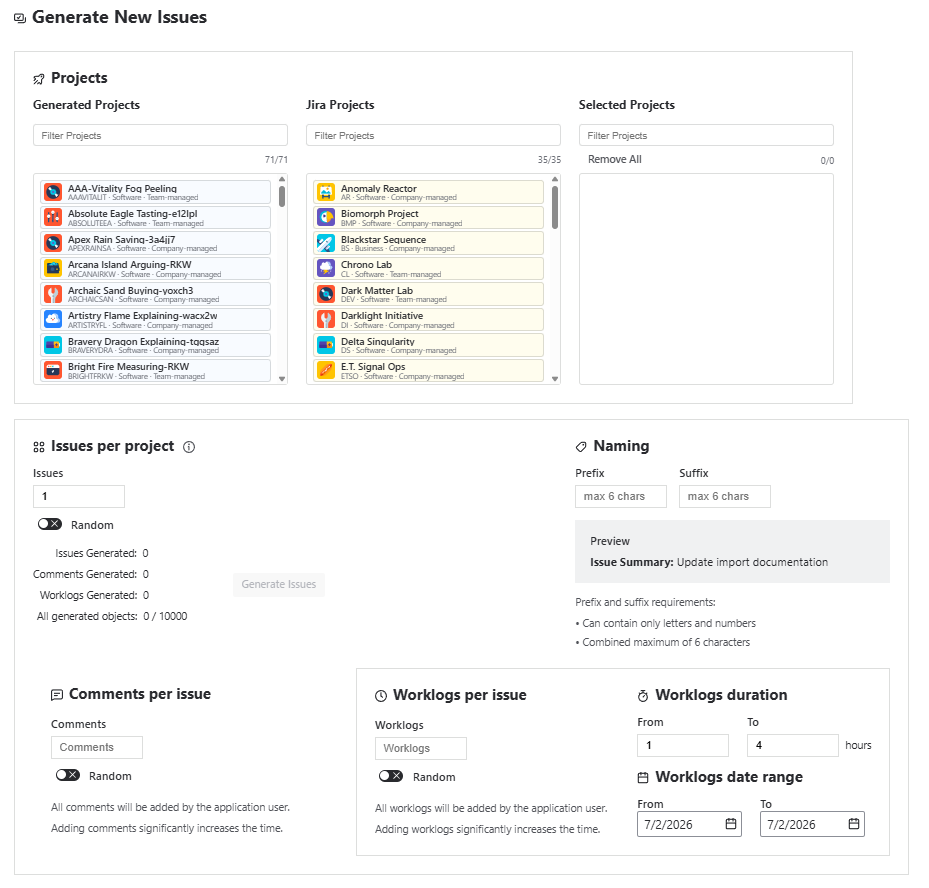
The Issues Creation module allows users to generate large volumes of issues across one or multiple Jira projects.
It supports both existing Jira projects and projects previously generated by Smart Data Generator, offering flexible configuration, naming patterns, and optional enrichment with comments and worklogs.
This module is ideal for demos, testing, performance validation, reporting scenarios, and onboarding simulations.
Project Selection
Users can choose where issues should be generated from two clearly separated lists:
1. Existing Jira Projects
- Displays all standard Jira projects the user has access to.
- Allows generating issues into any existing environment.
2. Projects Generated by Smart Data Generator
- Displays only projects created by the application.
- Ensures clarity when generating synthetic data.
Selection Limit
Users may select up to 20 projects per generation action.
Separation ensures full transparency and prevents accidental generation into unintended projects.
Limit helps ensure stable performance and predictable generation times across environments.
Issue Quantity Configuration
For each selected project, you may choose:
Fixed count
Example:
Generate exactly 150 issues for each project.
Random range
Example:
Generate 50–120 issues per project (the count is randomized for each project independently).
This enables creating more natural data distributions across environments.
Limit
- A single project may receive up to 1,000 generated issues.
Global Generation Limit
Each generation action has a combined total limit of:
10,000 objects per operation
(sum of issues + comments + worklogs)
This ensures predictable performance and prevents accidental overload.
Naming Rules
You may optionally apply:
- Prefix for issue summary
Example:TRAIN - Fix login issue - Suffix for issue summary
Example:Fix login issue - DEMO
Naming rules help distinguish generated datasets from real production data.
Comments Generation (Optional)
For each generated issue, comments can be automatically created.
Modes supported:
- Fixed number (e.g.,
5 comments per issue) - Random range (e.g.,
2–7 comments per issue)
Limits
- Maximum 10 comments per issue
Comments improve realism for demos, workflow testing, and analytics validation.
Worklogs Generation (Optional)
Worklogs may be added to each generated issue.
Supported modes:
- Fixed number (e.g.,
3 worklogs per issue) - Random range (e.g.,
1–6 worklogs per issue)
Worklog Parameters
- Duration: 1h to 80h
- Date Range: configurable; timestamps are assigned randomly within the range
Limits
- Maximum 10 worklogs per issue
Worklogs help validate:
- time tracking,
- reporting tools,
- sprint metrics (burndown, velocity),
- SLA or operational analytics.
Additional Notes
- Comments and worklogs are created after issues to ensure correct associations.
- Limits apply per generated issue and per generation batch.
- Project permissions must allow issue creation; otherwise, generation will skip restricted projects.
- Each project is processed independently when random ranges are used.