Projects Generation | Smart Data Generator Documentation
Projects Generation documentation.
Overview
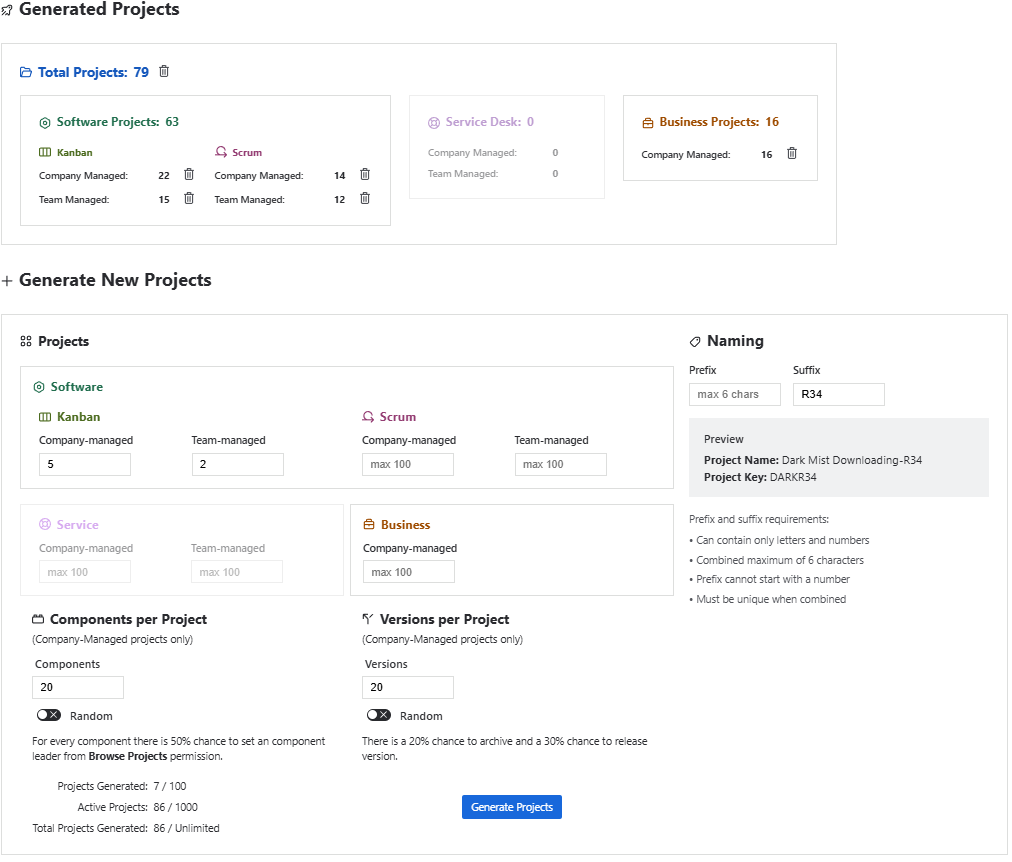
Smart Data Generator allows creating multiple Jira projects in a single run — across Software, Service Management, and Business categories, supporting both Company-managed and Team-managed project types.
The generator enables realistic, structured project creation with customizable naming patterns and optional additional metadata.
Supported Project Types
- Software Projects
- Scrum (Company-managed / Team-managed)
- Kanban (Company-managed / Team-managed)
- Service Management Projects
- Company-managed
- Team-managed
- Business Projects
- Company-managed
Generation Capabilities
Generate up to 100 projects in one operation
You may mix any number of project types in a single batch
(e.g., 20 Software Scrum + 10 SM projects + 5 Business CM projects).
The UI displays how many projects of each type will be generated before confirming the action.
Configuration Options
1. Quantity
For each project type, define:
- a fixed number of projects, or
- a mix of multiple types up to 100 total.
2. Naming Rules
- Prefix (e.g.,
DEMO-) - Suffix (e.g.,
-TRAIN)
These are applied automatically to each generated project name and key.
Components and Versions (Company-managed only)
For project types that support components and versions (Company-managed):
You can generate:
- Components
- Versions
Each supports:
- Fixed count → e.g., exactly
5 Components - Random range → e.g.,
3–12 Versions
Limits per project:
- Up to 20 Components
- Up to 20 Versions
Components and Versions are generated individually for every project in the batch.
For every component there is 50% chance to set an component leader from Browse Projects permission.
For every version there is a 20% chance to archive and a 30% chance to release version.
Deleting Generated Projects
Smart Data Generator tracks which projects were created in each generation run.
You can delete:
- **all projects, or
- all projects of a selected category , or
- all projects created in a specific generation action via the Activity History.
Deleting a project also removes:
- all issues
- all sprints
- all components & versions
- all associated data
Important: Deletion is permanent and cannot be undone.