Sprints Generation | Smart Data Generator Documentation
Sprints Generation documentation.
Overview
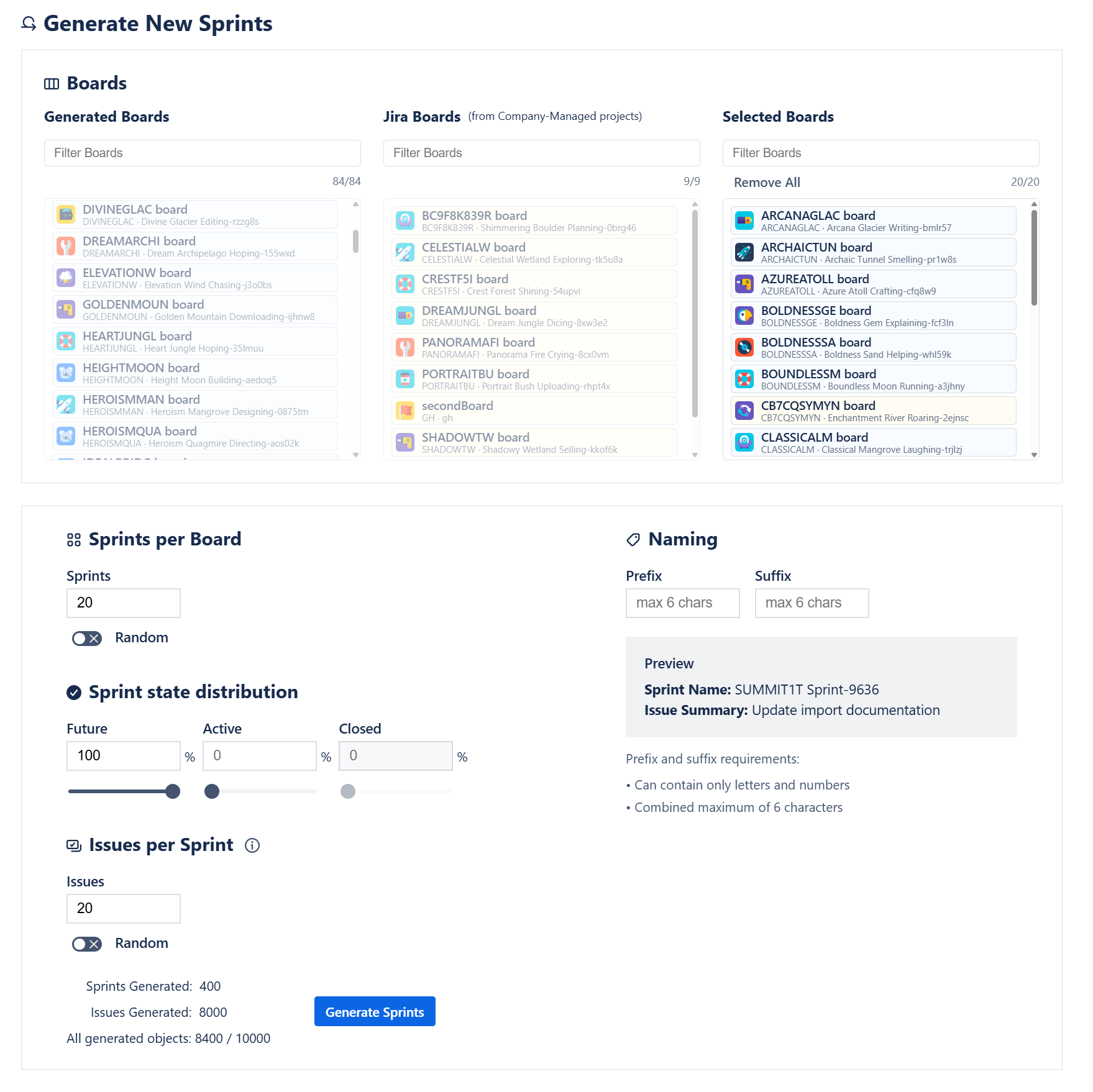
The Sprints Generation module enables automated creation of multiple sprints across one or more Scrum boards.
It is designed for preparing realistic agile data sets for demos, training sessions, reporting validation, and testing.
Users can configure sprint quantity, naming patterns, status distribution, and optionally generate issues inside each sprint.
Board Selection
Sprint generation is available only for Scrum boards.
Boards are presented in two separate lists, allowing the user to clearly understand where new sprints (and optionally issues) will be generated:
1. Boards from Existing Jira Projects
- Displays Scrum boards belonging to projects that already exist in the Jira instance.
- Useful for adding sprint structures to long-lived or test environments.
- Available for Company-managed projects only.
2. Boards from Smart Data Generator Projects
- Displays Scrum boards belonging to projects created through the Smart Data Generator.
- Helps users distinguish safe, synthetic environments from real production spaces.
This separation ensures complete clarity regarding where new sprint data will be generated.
Selection Limit
Users may select up to 20 boards in total during a single sprint generation action.
This limit guarantees predictable performance and prevents large, unsafe workload spikes across multiple Jira projects.
A board must contain at least one configured column for sprint creation to succeed.
Sprint Quantity Configuration
For each selected board, users may define:
Fixed number of sprints
Example:
Generate exactly 6 sprints on each selected board.
Random range
Example:
Generate 3–8 sprints per board.
Limit
- A maximum of 20 sprints can be generated per board.
This limit ensures controlled and predictable sprint creation for each environment.
Sprint Status Distribution
Users can define how generated sprints should be distributed across the three supported sprint states:
- Future
- Active
- Closed
Each state can be assigned a percentage, and the generator will create sprints that match the configured distribution as closely as possible.
Example:
- 40% Future
- 40% Active
- 20% Closed
The system automatically balances the final state assignments according to these ratios.
Issues in Sprints (Optional)
Smart Data Generator can optionally create issues directly inside each sprint.
Users can define:
- a fixed number of issues per sprint, or
- a random range (e.g., 5–12 issues per sprint)
Limit
- A maximum of 20 issues may be generated per sprint.
Issues generated for sprints contribute to:
- the per-sprint limit (20),
- the global issue limit,
- the global per-action cap of 10,000 objects.
Naming Rules
Users may configure sprint naming using:
- Prefix
- Suffix
Example final name:Training Sprint #4 - DEMO
Additional Notes
- Sprint creation requires the Manage Sprints permission.
- Boards with incomplete configurations (e.g., no columns) may fail sprint generation.
- All generated sprints appear in the Activity Stream, allowing removal via “Delete by Action.”