Free License | Dependency Governance Documentation
Free License documentation.
Free License with Extended Schemes
If you have an active Extended Schemes license on the same Jira Cloud site, you can use Dependency Governance at no additional cost for one year, without a separate Dependency Governance license.
Getting started
Install Dependency Governance on the Jira Cloud site where you use Extended Schemes.
If Dependency Governance does not have an active license of its own, your one-year access starts automatically when Dependency Governance detects your active Extended Schemes license. No activation key is required. Detection and activation may take up to one hour.
If Dependency Governance already has an active license, it uses that license, and the one-year access period through Extended Schemes does not start.
How long does access last?
Your access lasts for one year from activation. Your Extended Schemes license must remain active throughout this period.
If your Extended Schemes license expires or becomes inactive, access to Dependency Governance through Extended Schemes is unavailable. Reactivating your Extended Schemes license restores access for the remainder of the original period—it does not start a new year. The one-year period continues to run while your Extended Schemes license is inactive.
Checking your free license status
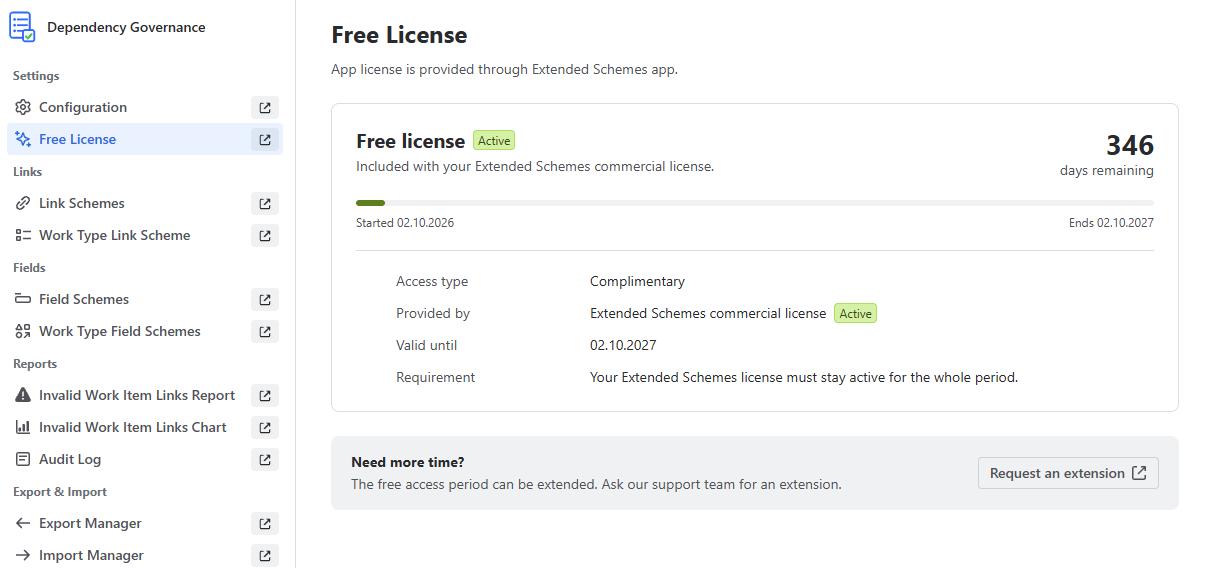
When you use Dependency Governance through your Extended Schemes license, a Free License item appears in the Dependency Governance navigation menu.
Open Free License to check:
- Your free access status
- The number of days remaining
- The start and expiration dates
- The status of the Extended Schemes license providing your access
You can also select Request an extension on this page to contact our support team.
What happens after one year?
To continue using Dependency Governance, you need either:
- An active Dependency Governance license
- A valid access extension key and an active Extended Schemes license on the same Jira Cloud site
If you have an active Dependency Governance license, you can use Dependency Governance independently of your Extended Schemes license.