Configuration | Dependency Governance Documentation
Configuration documentation.
The Configuration page allows defining global behaviour for Depencency Governance.
It includes settings that affect:
- how link schemes are applied to new spaces
- how work items are displayed in the Dependencies Panel
- how invalid links are handled
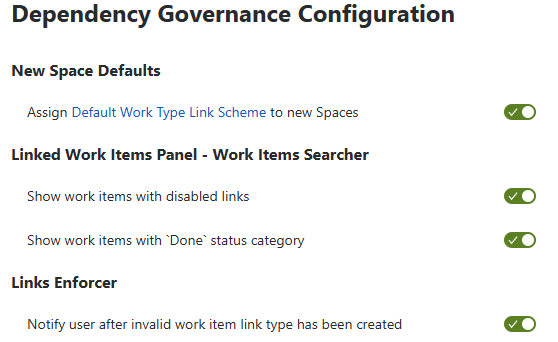
New Space Defaults
Assign Default Work Type Link Scheme to New Spaces
Automatically assigns a default Work Type Link Scheme to every newly created space.
Behavior
- When a new space is created:
- the selected Work Type Link Scheme is assigned automatically
- Ensures link control is applied from the start
- Eliminates the need for manual setup
Purpose
- Enforce consistency across newly created spaces
- Reduce configuration overhead
- Ensure governance is applied by default
Dependencies Panel – Work Items Searcher
Controls how work items are displayed and filtered in the Dependencies Panel.
Show Work Items with Disabled Links
Determines whether work items that do not allow the selected link type based on full validation rules are visible in the work item searcher.
Behavior
Enabled:
- work items that do not meet validation rules are still visible
- such work items are disabled (greyed out) and cannot be selected
Disabled:
- only work items that pass validation on both sides are shown
- all visible work items can be selected
Purpose
- Enabled → full visibility of potential targets, including invalid ones
- Disabled → clean, actionable list with only valid options
Notes
- Validation always checks:
- source work item (outward)
- target work item (inward)
- Final validation is enforced regardless of visibility settings
- Work Items that do not meet validation rules may still be visible depending on configuration
- Such work items are displayed as disabled (greyed out) and cannot be selected
Show Work Items with Done Status Category
Controls visibility of work items that belong to the Done status category.
Behavior
- Enabled:
- Done work items are visible
- Disabled:
- Done work items are hidden
Purpose
- Reduce noise in active work views
- Focus only on relevant, ongoing work items
- Keep historical links available when needed
Links Enforcer
Controls behavior when invalid links are created.
Notify User After Invalid Work Items Link Type Has Been Created
Enables real-time notification when a link does not comply with configuration.
Behavior
When enabled:
- invalid link is created
- user is notified via error message
- user can:
- remove the link
- update the link
When disabled:
- no notification is shown
Purpose
- Improve awareness of invalid links
- Provide immediate feedback
- Allow gradual adoption of link rules without blocking users
Behavior
- All changes are applied immediately after toggling an option
- No confirmation or Save action is required
- Settings take effect instantly across:
- all users
- all spaces
Notes
- Each toggle acts as an independent change
- There is no batching of changes
- Changes are applied in real time
- Changes are applied globally
Permissions
Access to Configuration requires:
- Jira administrator or space administrator permissions
- Access to Depencency Governance administration