Dependencies Panel | Dependency Governance Documentation
Dependencies Panel documentation.
The Dependencies Panel is the central place where users can view, create, and manage work items links.
It replaces Jira’s native linked work items view with a controlled and enhanced interface that:
- enforces link rules,
- provides additional actions,
- and displays richer work items details.
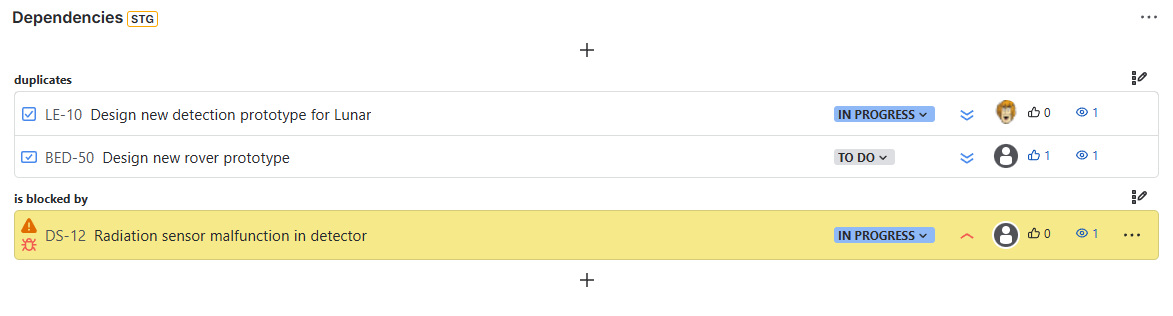
{.img-center .img-full}
Purpose of the Dependencies Panel
The panel is designed to:
- Provide a clear view of all linked work items
- Enable safe creation of links
- Allow editing and bulk operations
- Present relevant work items details without opening each work item
It combines visibility, control, and interaction in a single place.
Key Capabilities
The Dependencies Panel supports:
- Viewing linked work items grouped by link type
- Creating new links using multiple input methods
- Creating new linked work items
- Updating existing links
- Performing bulk operations within link groups
- Displaying configurable work items details
- Editing selected work item fields directly from the panel
- Highlighting invalid links directly in the panel
Invalid Link Highlighting
The panel visually indicates links that do not comply with current configuration.
Behavior
- Links that violate configured rules are highlighted with a yellow background
- Highlighting appears directly in the panel
- Applies to all visible linked work items
Purpose
- Quickly identify invalid or outdated relationships
- Support cleanup after configuration changes
- Improve visibility of inconsistencies without running reports
Notes
- Highlighting does not remove or modify links
- Invalid links remain visible until manually updated or removed
- Full list of invalid links can be analyzed using:
→ Invalid Work Item Links Report
Link Grouping
Linked work items are grouped by link type, similar to Jira’s native panel.
Each group represents:
- a specific relationship type
- a direction (inward or outward)
This structure makes it easy to:
- understand dependencies
- navigate relationships
- perform group-level actions
Creating Links
The panel allows creating links using several methods:
- Search by work item key
- Search by summary
- Paste work item keys
- Paste work item URLs
Only links allowed by configuration are available.
→ See: Creating Links
Creating Linked Work Items
You can create a new work item and link it in one step.
This allows:
- fast creation of dependent work
- immediate linking without context switching
→ See: Creating Linked Work Items
Updating Links
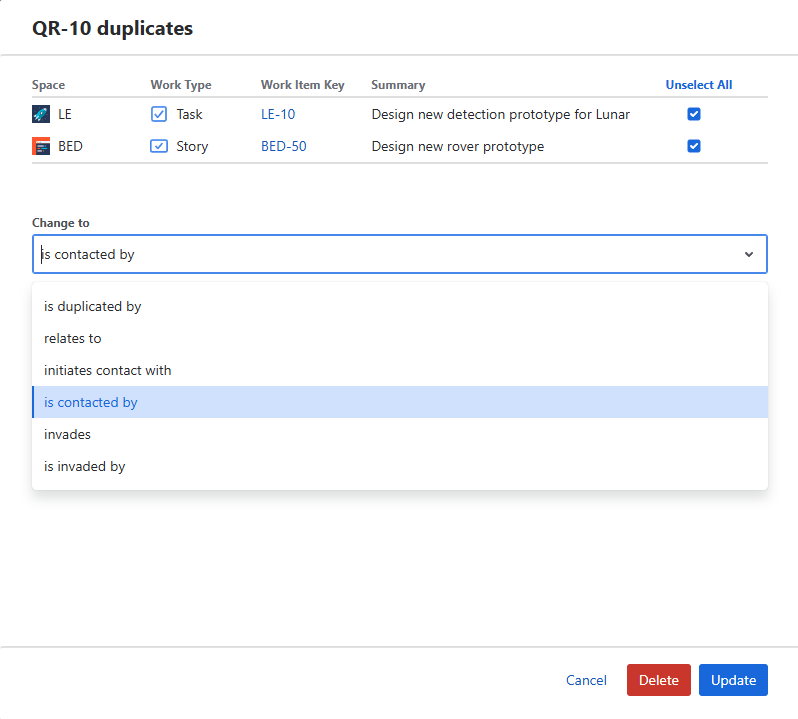
Existing links can be modified or removed directly from the panel.
Available actions depend on configuration and permissions.
Single Link Actions
For each linked work item, the following actions may be available:
- Update link type
- Remove link
Actions are visible only if enabled in configuration.
Bulk Operations
Within each link group, you can perform bulk actions:
- Bulk update links
- Bulk delete links
Behavior
- All operations are validated against link rules
- Invalid updates are blocked
- Bulk actions are applied only to selected or grouped work items
This allows efficient management of multiple relationships while maintaining full control and consistency.
→ See: Updating Links
Linked Work Items Details
Each linked work item displays selected fields directly in the panel.
This includes:
- status
- assignee
- priority
- and other configured fields
The layout and available actions depend on:
- Field Schemes
- Work Type Field Schemes
→ See: Linked Work Item Details
Validation Behavior
All operations in the panel are validated against link rules.
When creating or updating links:
- Source work item rules are checked
- Destination work item rules are checked
If a link is not allowed:
- it is not shown in the UI
- or the operation is blocked
Where It Is Available
The Dependencies Panel is available on:
- Work Item view (as an app panel)
It can be accessed via:
- App Actions → Dependencies