Creating Links | Dependency Governance Documentation
Creating Links documentation.
The Dependencies Panel allows creating links in a fast and flexible way, using multiple input methods.
All link creation is validated against configured rules, ensuring that only allowed relationships can be created.
Available Input Methods
You can create links using:
- Search by Work Item Key
- Search by Summary
- Paste Work Item Key
- Paste Work Item URL
Each action adds a single work item at a time.
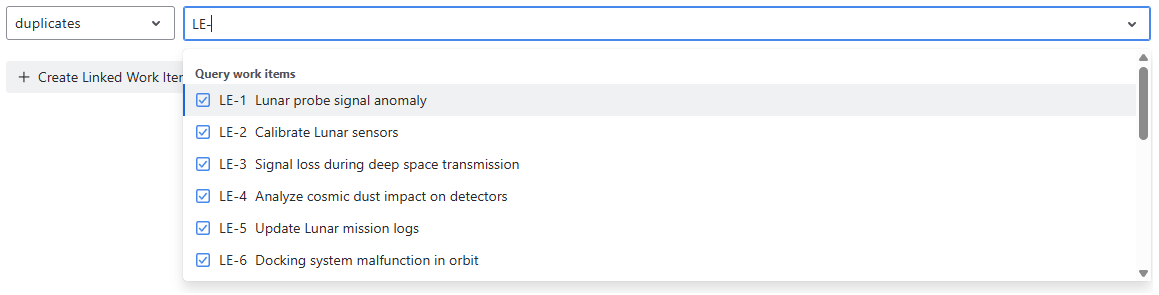
Search by Work Item Key
Allows direct lookup of work items using their key.
Behavior
- Type an work item key (e.g.,
PROJ-123) - Matching work items are suggested
- Multiple work items can be selected
Search by Summary
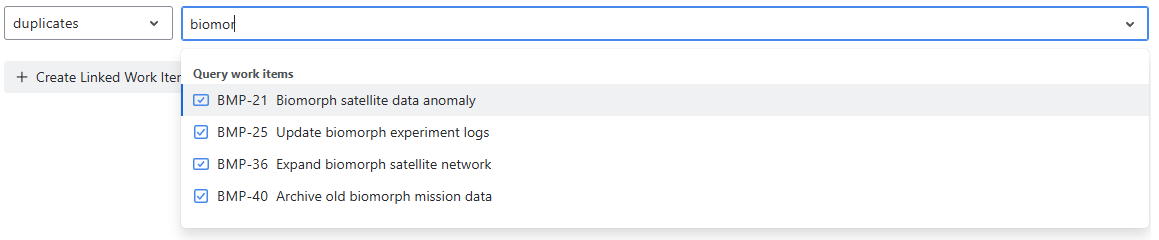
Allows finding work items using text search.
Behavior
- Enter part of the work item summary
- Matching work items are displayed in the results
- Supports selecting multiple work items
Paste Work Item Key
You can paste a single work item key.
Behavior
- Supports format:
PROJ-1
- The key is parsed automatically
- Matching work item is resolved and added to the selection
Paste Work Item URL
You can paste a single Jira work item link.
Behavior
- URL is automatically parsed
- Work Item key is extracted
- Corresponding work item is added to the selection
Link Type Selection
Before creating links, you must select a link type.
Behavior
- Only allowed link types are available
- Available options depend on:
- source work item configuration
- destination work item configuration
- Default link type may be preselected
Creating Links
After selecting:
- one or more work items
- a link type
You can confirm link creation.
Validation Behavior
Every link is validated before creation.
Validation Rules
- Source work item must allow the link (outward)
- Destination work item must allow the link (inward)
UI Behavior
- Disallowed link types are not shown in the selector
- If validation fails:
- the link is not created
- the operation is blocked
Multiple Link Creation
You can create multiple links in a single operation.
Behavior
- Each link is validated independently
- Valid links are created
- Invalid ones are rejected
UX Notes
- Input methods can be combined (search + paste)
- Duplicate work items are ignored
- Already linked work items are not duplicated
- The UI ensures only valid options are available