Updating Links | Dependency Governance Documentation
Updating Links documentation.
The Dependencies Panel allows modifying and removing existing links directly from the work item view.
All operations are performed with full validation, ensuring that only allowed changes can be applied.
Scope
This section applies only to managing work items links (relationships).
Editing work item fields directly on the panel is described separately in:
Available Actions
Link actions depend on configuration and may include:
- Update link
- Remove link
Actions are available per linked work item and may be enabled or disabled depending on settings.
Updating a Link
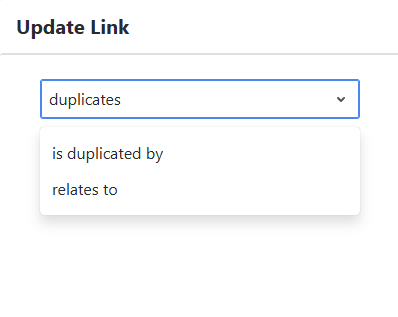
You can change the type of an existing link.
How It Works
- Select the Update action for a linked work item
- Choose a new link type
- Confirm the change
Behavior
- Only allowed link types are available
- Current link type is preselected
- Change is applied immediately after confirmation
Removing a Link
You can remove an existing link between work items.
How It Works
- Select the Remove action
Behavior
- Link is removed immediately after clicking the action
- No confirmation step is required
- The related work item disappears from the panel instantly
Bulk Operations
Bulk operations are available within each link group.
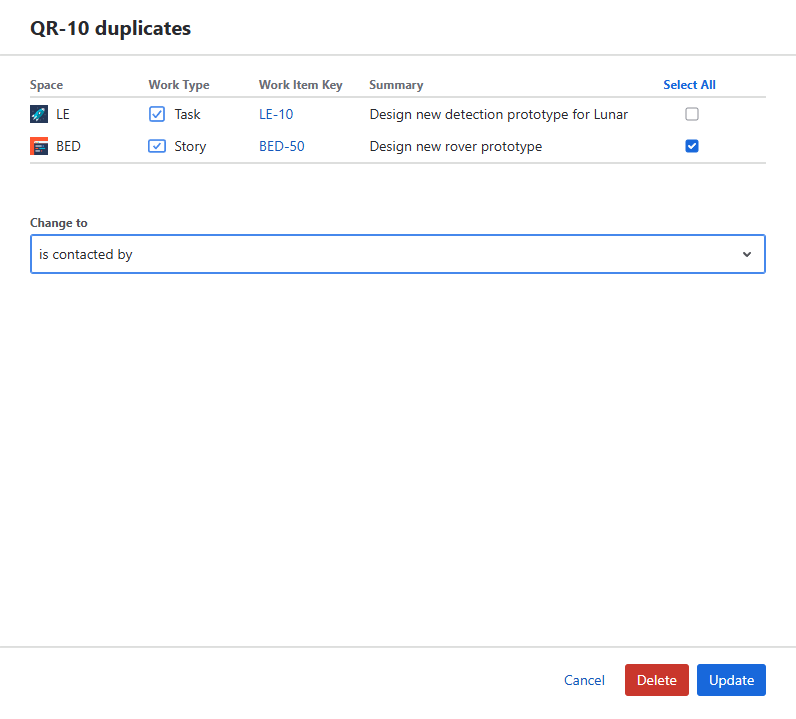
Selecting this option opens a view with all work items in the selected group.
Selecting Work Items
- A list of all linked work items in the group is displayed
- You can:
- Select all work items
- Select only chosen work items
Choosing Link Type
- A target link type selector is available
- Required only for bulk update
- Not relevant for bulk removal
Available Actions
After selecting work items, two actions are available:
- Update Links
- Remove Links
Each action is triggered by a separate button.
Bulk Update Links
Updates the link type for selected work items.
Behavior
- Existing links are removed first
- New links are then created using the selected work type
- Each operation is validated independently
- Only allowed link types can be selected
Bulk Remove Links
Removes links for selected work items.
Behavior
- Selected links are removed immediately
- No confirmation step is required
- Link type selection is ignored
Validation Behavior
- Validation is applied per work item
- Invalid updates are blocked
- Valid updates are applied
UI Behavior
- All work items in the group are visible during selection
- Users can precisely control which links are affected
- Removal actions are executed immediately
Limitations
- Existing invalid links are not automatically corrected
- Changes must be performed manually
- Bulk operations follow the same rules as single updates