Invalid Work Item Links Report | Dependency Governance Documentation
Invalid Work Item Links Report documentation.
The Invalid Work Item Links Report identifies work item links that do not comply with configured link rules.
It provides visibility into inconsistencies and helps maintain data quality across spaces.
Purpose
The report is designed to:
- Detect links that violate current configuration
- Support initial rollout of link control
- Enable periodic audits
- Help clean up invalid relationships
What Is Considered an Invalid Link
A link is considered invalid when:
- The link type is not allowed for the source work item (outward), or
- The link type is not allowed for the destination work item (inward)
Both sides must allow the link for it to be valid.
Where It Is Available
The report is available in:
- Administration → Invalid Work Item Links Report
Running the Report
To generate the report:
- Open the report page
- Click Generate Report
Behavior
- The report scans all spaces with configured link restrictions
- Only projects (spaces) with active configuration are analyzed
- Results are generated based on current configuration
Report Results
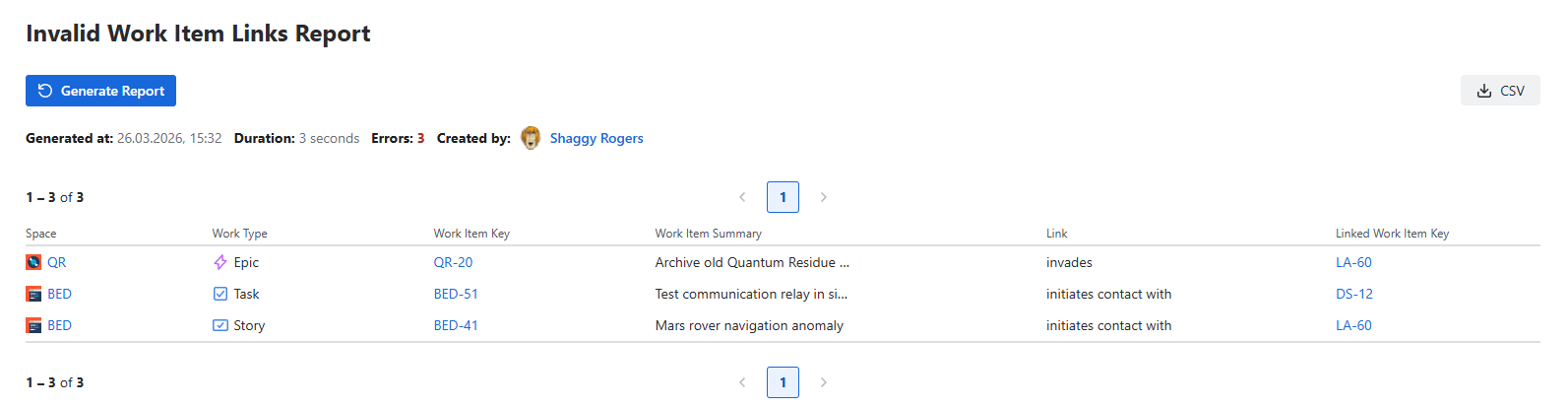
The report displays results in a table format.
Table Columns
Each row represents a single invalid link and includes:
- Space
- Work Type
- Work Item Key
- Work Item Summary
- Link
- Linked Work Item Key
Pagination
- Results are displayed in pages
- Each page shows 20 entries
- Navigation is available at the bottom of the table
Report Metadata
Above the results table, the following information is displayed:
- Generated at — timestamp of report execution
- Duration — time taken to generate the report
- Errors — number of work items encountered during execution
- Created by — user who generated the report
Report History
Each report execution is recorded and contributes to historical tracking of invalid links.
For a visual overview and trend analysis, see:
Using the Report
The report helps to:
- Identify incorrect relationships
- Plan cleanup actions
- Validate configuration changes
- Monitor system health
Important Notes
- The report does not modify any data
- Invalid links are not automatically removed
- Cleanup must be performed manually
- The report is limited to 1000 errors. After reaching this limit, further scanning is stopped. Additional invalid links may exist but are not included in the results
- If invalid links are found but the user does not have access to at least one work item in a link, the total error count will include a note in the format: (# links hidden), where # represents the number of hidden links
Typical Use Cases
- After enabling link control for the first time
- After updating Link Schemes
- During regular system audits
- After migrations or bulk changes
Permissions
Access requires:
- Jira administrator or space administrator permissions
- Access to Depencency Governance administration