Invalid Work Item Links Chart | Dependency Governance Documentation
Invalid Work Item Links Chart documentation.
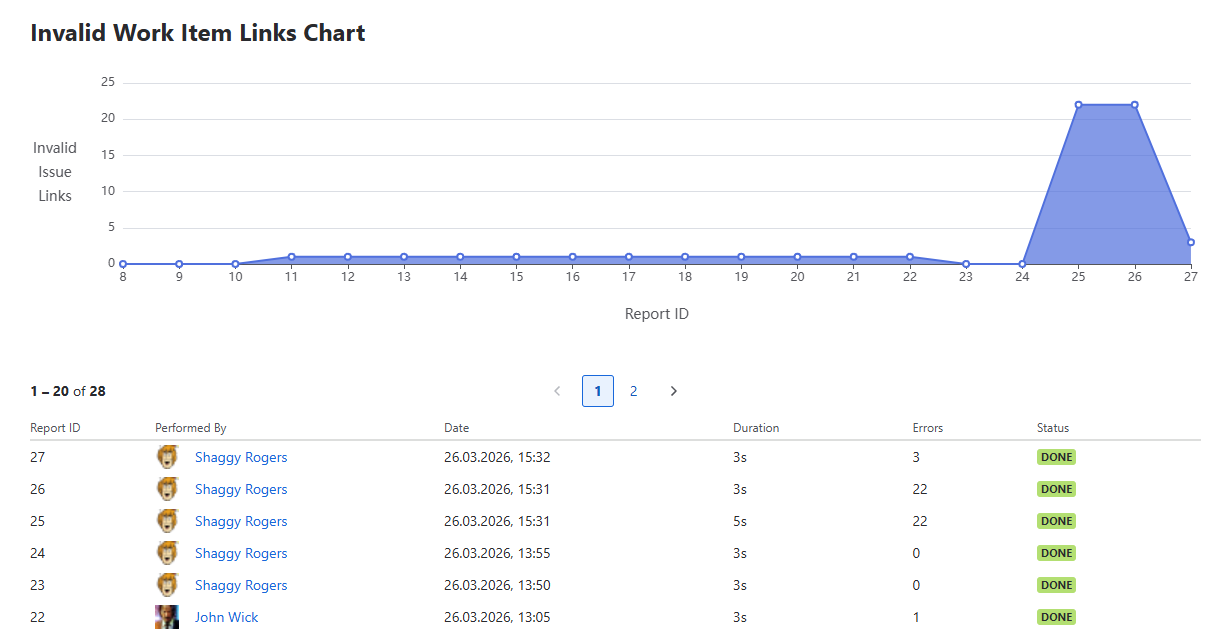
The Invalid Work Item Links Chart provides a visual overview of invalid links detected over time.
It is based on data collected from executions of the Invalid Work Item Links Report.
Purpose
The chart is designed to:
- Track the number of invalid links over time
- Monitor the impact of configuration changes
- Support auditing and compliance
- Identify trends and improvements
Chart Overview
The chart displays the number of invalid links for each report execution.
Axes
- Y-axis — Number of Invalid Work Item Links
- X-axis — Report ID
Visualization
- Displayed as an area chart
- Data points represent individual report executions
Behavior
- Each point corresponds to a single report run
- Allows quick comparison between executions
- Helps identify increases or decreases in invalid links
Report List
Below the chart, a table of report executions is displayed.
Table Columns
Each row represents a single report execution:
- Report ID
- Performed By
- Date
- Duration
- Errors
- Status
Behavior
- Historical entries contain summary data only
- Detailed work item-level data is not available for past reports
- The table is paginated
- Allows navigating through historical report executions
Relationship with Invalid Work Item Links Report
- The chart visualizes results generated by the report
- Each entry corresponds to a report execution
Data Availability
- Detailed data is available only for the most recent report execution
- Historical reports provide summary information only (via the table below)
To view full details, see:
→ Invalid Work Item Links Report
Usage
The chart can be used to:
- Monitor system health over time
- Verify the effect of configuration updates
- Track cleanup progress
- Identify spikes in invalid links
Notes
- The chart does not modify any data
- It reflects historical report executions only
- Accuracy depends on how frequently the report is run