Work Type Link Schemes | Dependency Governance Documentation
Work Type Link Schemes documentation.
Work Type Link Schemes define how Link Schemes are applied to spaces and work types.
They act as a mapping layer between:
- Spaces
- Work Types
- Link Schemes
This configuration determines which Link Scheme is used by each work item and directly controls how work item links are validated across Jira.
Purpose of Work Type Link Schemes
Work Type Link Schemes allow you to:
- Apply link control to specific spaces
- Define a default Link Scheme for all work types
- Override link behavior for selected work types
- Reuse the same configuration across multiple spaces
They provide flexibility while keeping configuration centralized and predictable.
Assignment Model
Work Type Link Scheme
- May be not assigned to any space
- May be assigned to one or more spaces
Space
- May have no Work Type Link Scheme assigned
- May have only one Work Type Link Scheme assigned
This means:
- Work Type Link Schemes are reusable
- Each space can use at most one configuration
If a space has no scheme assigned:
- No link restrictions are enforced
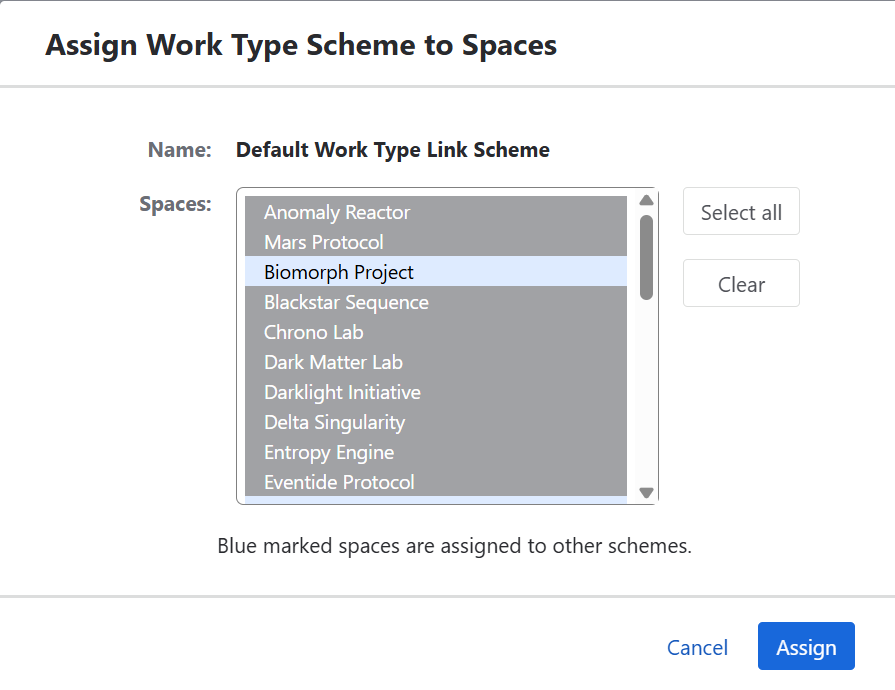
Work Type Link Schemes Table
Name
- Displays the name of the scheme
- Clicking the name opens the Configuration View
Spaces
- Displays a list of spaces assigned to the scheme
- Provides quick visibility into where the configuration is active
Operations
Assign
- Opens a space selection view
- Allows assigning the scheme to selected spaces
- If a space already has a scheme assigned, it is replaced
Configure
- Opens the configuration view
- Allows defining default and work-type-specific Link Schemes
Edit
- Allows editing:
- Name
- Description
Delete
- Opens a confirmation dialog
- Removes the scheme after confirmation
- May be restricted if the scheme is assigned to spaces
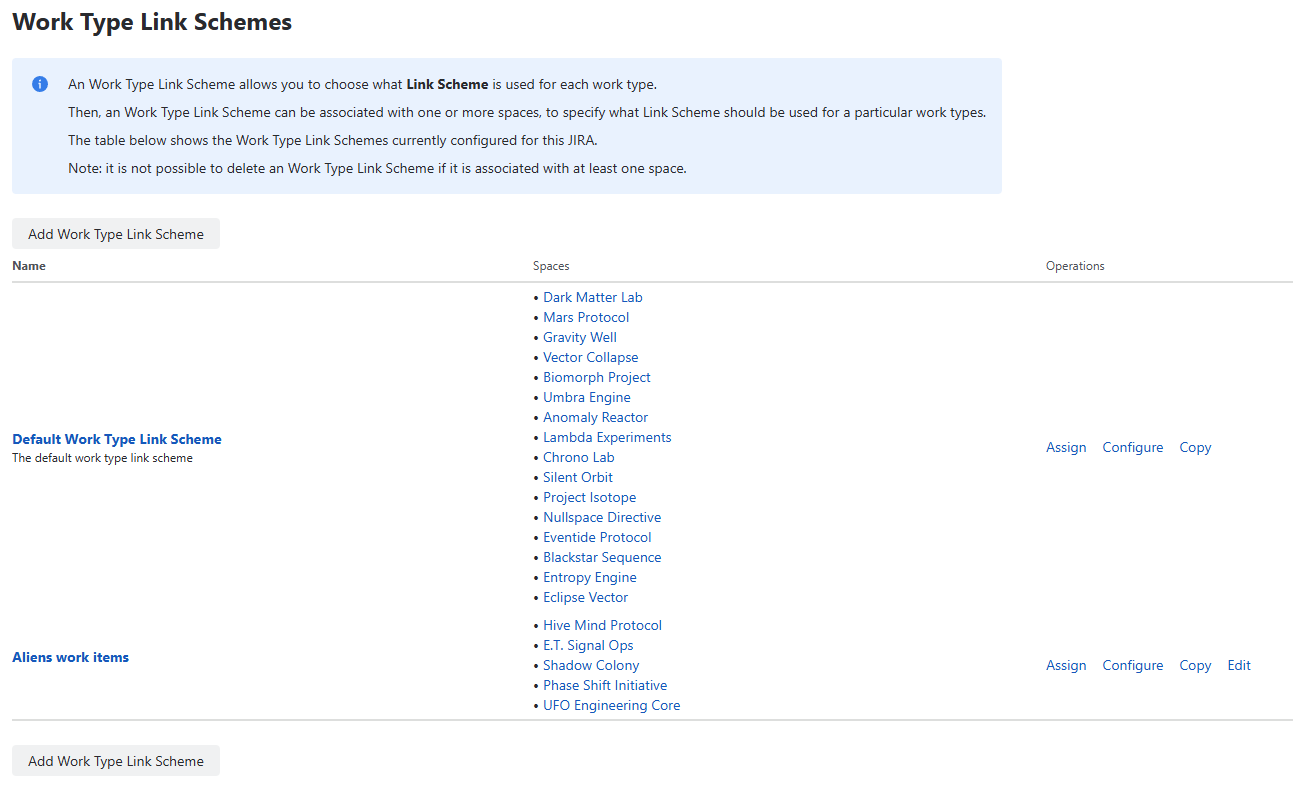
Assigning Scheme to Spaces (Assign Action)
Clicking Assign opens a selection view:
- Displays a list of available spaces
- Allows selecting one or multiple paces
- After confirmation:
- The scheme is assigned to selected spaces
- Any previous scheme assignment is replaced
This operation defines where link control becomes active.
Configuration View
The configuration view defines how Link Schemes are resolved.
All configuration is presented as a single list, where each row represents a mapping:
- Work Type → Link Scheme
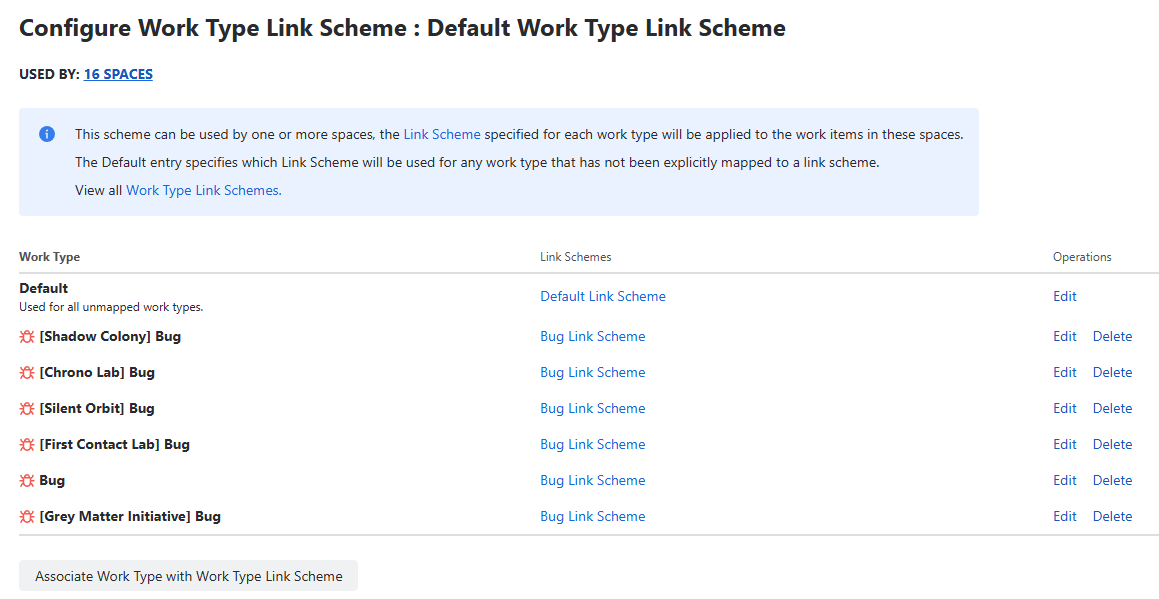
Default Mapping (Required)
At the top of the list, there is always one default entry.
Characteristics
- It is always present
- It cannot be removed
- It represents the fallback configuration for all work types
- It has a Link Scheme selector that can be changed
Behavior
- Applies to all work types without specific overrides
- Ensures every work item always resolves to a Link Scheme
- Acts as the base configuration for the entire space
Work Type Mappings
Additional mappings can be added below the default entry.
Each mapping defines:
- Work Type
- Link Scheme
Configuration
- Work Type is selected from available Jira work types
- Link Scheme is selected from existing Link Schemes
- Each Work Type can appear only once
Selection Behavior
- Work Types that are already used in existing mappings:
- Do not appear in the dropdown
- This prevents duplicate mappings for the same Work Type
- Ensures that each Work Type is configured at most once
Managing Mappings
Users can:
- Add new mappings
- Change Link Scheme for any mapping
- Remove mappings (except the default one)
Important Rules
- The default mapping cannot be deleted
- All other mappings are optional and removable
- At least one mapping (default) always exists
Save Behavior
- All changes require clicking Save
- After saving:
- Configuration is applied immediately
- All assigned spaces follow updated rules
Existing work item links are not modified.
Effective Link Scheme Resolution
For every work item, exactly one Link Scheme is resolved:
- Check if the space has an Work Type Link Scheme
- If not → no restrictions apply
- If assigned:
- Use work-type-specific Link Scheme (if configured)
- Otherwise use Default Link Scheme
This happens independently for:
- Source work item
- Destination work item
Validation Behavior
When creating or updating links:
- Source work item resolves its Link Scheme
- Destination work item resolves its Link Scheme
For the link to be created:
- Source must allow the link Outward
- Destination must allow the link Inward
If either side blocks the link → operation is rejected
Example
- Space has an Work Type Link Scheme assigned
- Default Link Scheme allows only Relates
- Bug work type has override allowing only Blocks
Results:
Bug → Task using Blocks
✔ AllowedTask → Bug using Blocks
✖ Blocked (default does not allow it)Bug → Task using Relates
✖ Blocked (Bug override does not allow it)
UX Notes and Behavior Details
- Changing assignment immediately affects all users working in the space
- Dropdowns display only existing Link Schemes
- No automatic migration of existing links occurs
- Removing a scheme from a space disables link control for that space
- Overrides are optional and should be used only when needed
- Work Type dropdown automatically filters out already configured work types
- Prevents duplicate mappings and simplifies configuration
Permissions
Managing Work Type Link Schemes requires:
- Jira administrator or space administrator permissions
- Access to Depencency Governance administration