Dashboard & Filters | Sprint Organizer Documentation
Dashboard & Filters documentation.
Sprint Organizer's fields can be used throughout Jira becouse they are standard Jira custom fields, they can be used anywhere Jira supports JQL or custom fields, including:
- Dashboards
- Saved Filters
- Filter Subscriptions
- Automations
- Reports
- Dashboard Gadgets
The examples below demonstrate practical ways to build dashboards and filters using Sprint Reporting fields.
Dashboard Gadgets
Sprint Reporting fields can be used with many standard Jira dashboard gadgets, including:
- Filter Results
- Work Item Statistics
- Pie Chart
- Two Dimensional Filter Statistics
- Filter Counts
- Created vs Resolved Chart
Depending on the selected gadget, Sprint Reporting fields can be used either as JQL filters or as grouping/statistics fields.
Example Gadgets Configuration
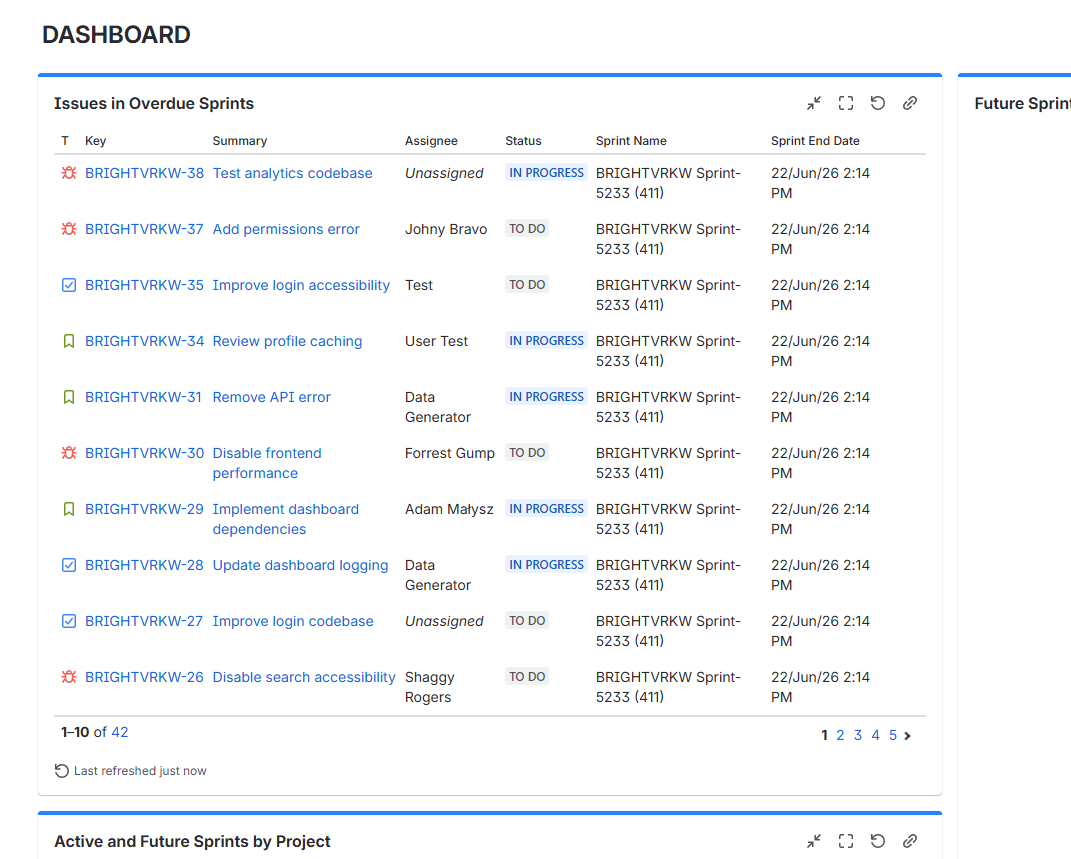
Work items in Overdue Sprints
Displays work items that belong to active sprints whose planned end date has already passed and work on work item is not finished.
Gadget: Filter Results
Filter:
"Sprint State" = Active AND "Sprint End Date" < now() AND status != Done
Suggested columns:
- Type
- Key
- Summary
- Assignee
- Status
- Sprint Name
- Sprint End Date
 {.img-center .img-large}
Open Work Items in Sprints Ending Within Two Weeks
Displays work items that should be completed before upcoming sprint deadlines.
Gadget: Filter Results
Filter:
"Sprint End Date" >= now() AND "Sprint End Date" <= startOfDay("+14d") AND status != Done ORDER BY "Sprint End Date"
Suggested columns:
- Type
- Key
- Summary
- Sprint Name
- Sprint End Date
- Assignee
- Status
{.img-center .img-large}
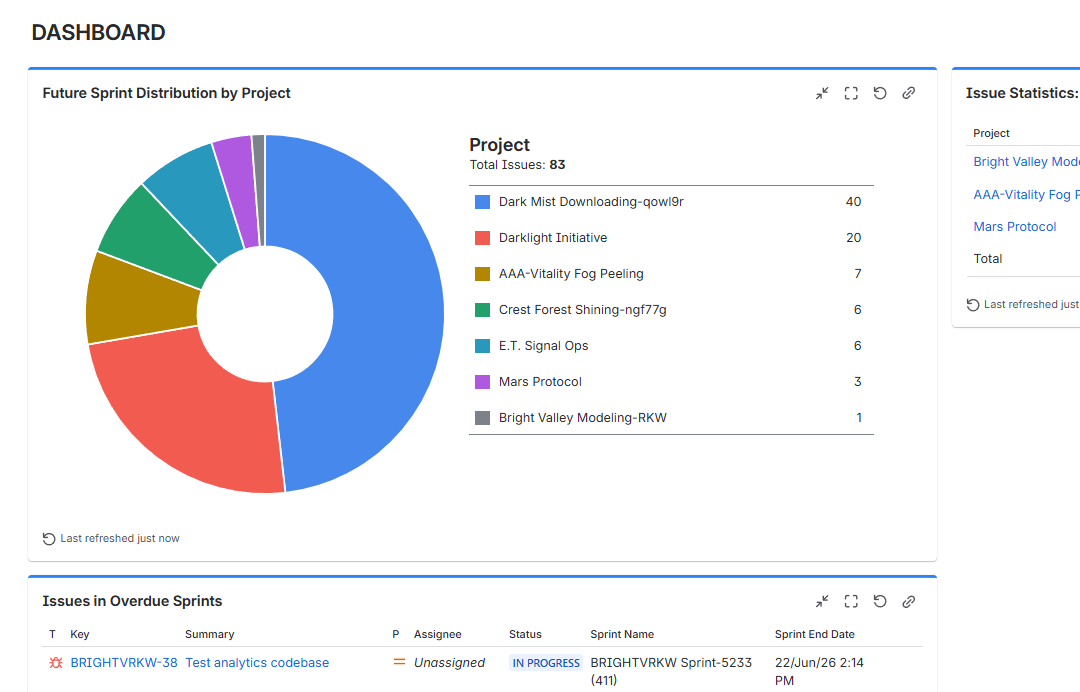
Future Sprint Distribution by Project
Displays how work planned for future sprints is distributed across Jira projects.
Gadget: Pie Chart
Filter:
"Sprint State" = Future
Statistic Type: Project
 {.img-center .img-large}
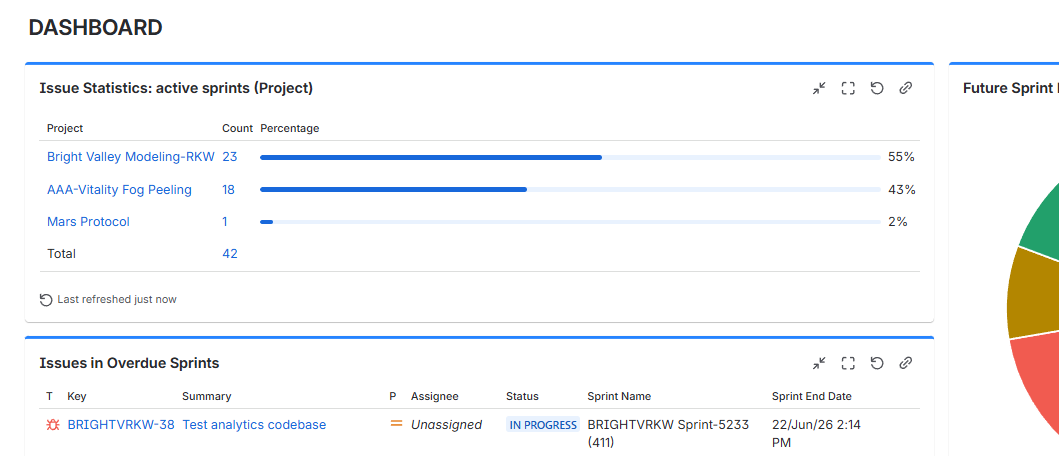
Active Sprint Distribution by Project
Displays the number of work items currently assigned to active sprints on each Space.
Gadget: Work Item Statistics
Filter:
"Sprint State" = Active
Statistic Type: Project
 {.img-center .img-large}
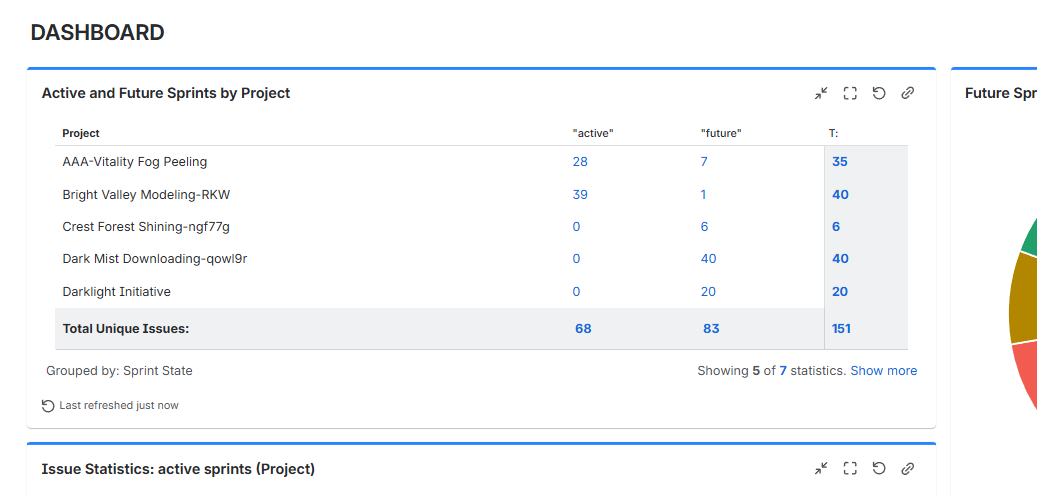
Active and Future Sprints by Project
Provides an overview of Active and Future sprint work items across all projects.
Gadget: Two Dimensional Filter Statistics
Filter:
"Sprint State" IS NOT EMPTY
Rows: Project
Columns: Sprint State
 {.img-center .img-large}
Gadget Compatibility
Sprint Reporting fields are compatible with most standard Jira dashboard gadgets.
Some gadgets, such as Two Dimensional Filter Statistics, may require the selected Sprint Reporting field to be added to the Team-Managed project's Fields configuration before values are grouped correctly.
If a gadget displays unexpected Irrelevant values or does not group work items by a Sprint Reporting field, verify that the corresponding field has been added to the project's field configuration.
Common Use Cases
Sprint Reporting fields can be used to:
- Monitor overdue sprints
- Identify work items in sprints ending soon
- Analyze sprint distribution across Scrum boards
- Compare sprint activity across multiple projects
- Build sprint-focused dashboards
- Create advanced Jira filters
- Trigger Jira automations based on sprint metadata
- Report on current and historical sprint participation