Dashboard | Sprint Organizer Documentation
Dashboard documentation.
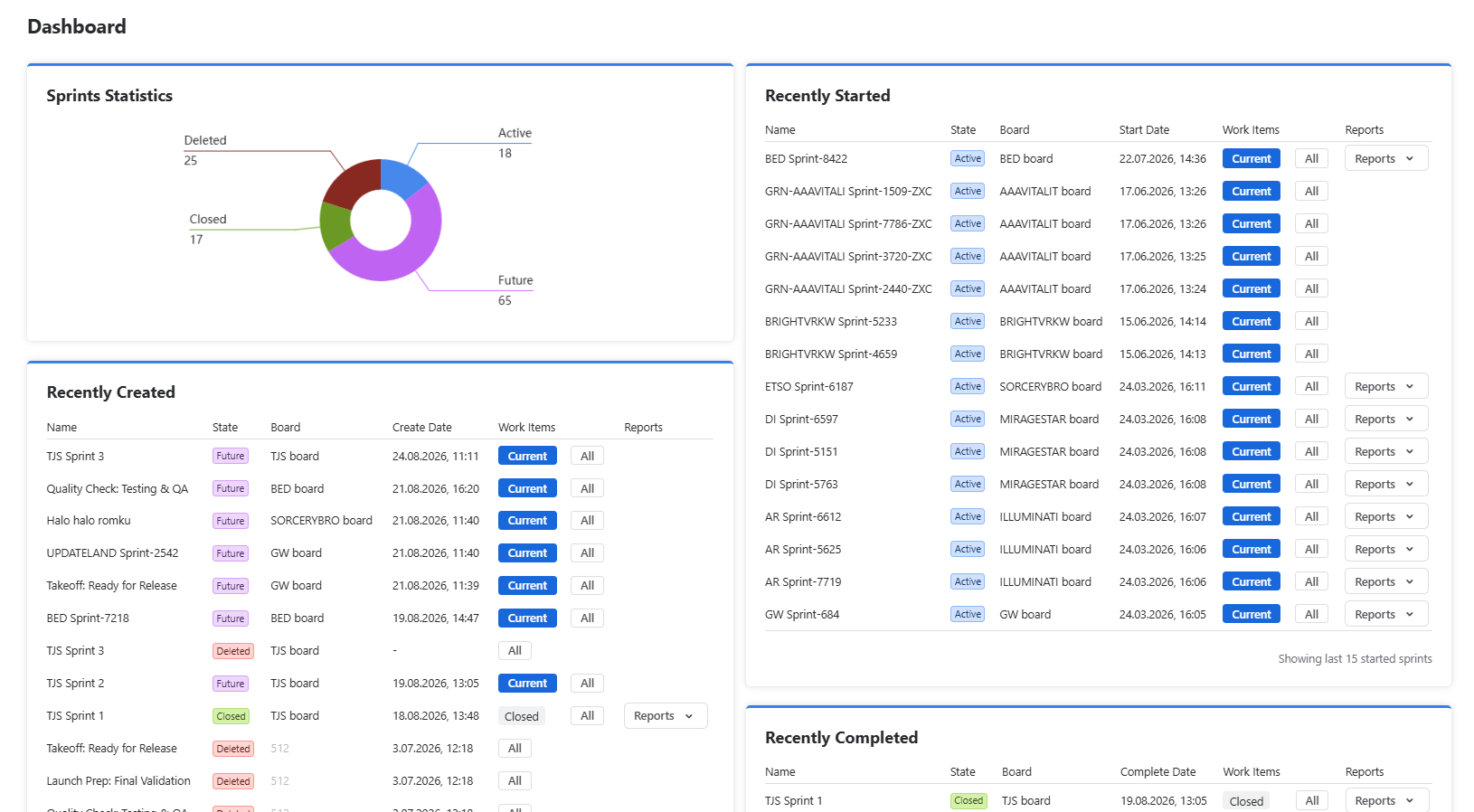
The Global Dashboard is the primary entry point for monitoring sprint activity across your Jira instance.
It provides an aggregated view of sprint health, recent activity, and overall sprint distribution, allowing administrators to quickly understand what is happening across multiple teams, spaces, and boards without browsing individual Jira boards.
Unlike the Space Dashboard, which is limited to a single space, the Global Dashboard aggregates information from every sprint the current user is permitted to access.
The page is designed for Jira administrators, Agile Coaches, PMOs, and Scrum Masters responsible for monitoring sprint activity across the organization.
 {.img-center .img-large}
Statistics
The Statistics section provides a high-level overview of sprint distribution by state.
Available sprint states include:
- Active
- Future
- Closed
- Deleted
Deleted sprints are tracked only from the moment Sprint Organizer is installed. Sprints deleted before installation are not included in statistics.
The chart provides a quick understanding of the current sprint landscape and can help identify unusual situations, such as unexpectedly large numbers of deleted or future sprints.
Widgets
The Dashboard contains widgets highlighting recent sprint activity across the entire Jira instance.
Recently Started
Displays the most recently started Active sprints.
Information displayed:
- Name
- State
- Board
- Start Date
- Work Items
- Reports
Recently Created
Displays the most recently created sprints.
Information displayed:
- Name
- State
- Board
- Create Date
- Work Items
- Reports
Recently Closed
Displays the most recently completed sprints.
Information displayed:
- Name
- State
- Board
- Complete Date
- Work Items
- Reports
Together, these widgets provide administrators with an overview of recent sprint activity without requiring them to search individual boards or spaces.
Health Indicators
The Dashboard serves as a central health overview for sprint management.
By combining sprint statistics with recent activity, administrators can quickly identify situations that may require further investigation, including:
- Unexpectedly deleted sprints
- Unusually large numbers of Future or Active sprints
- Recently completed sprint waves
- Significant increases in sprint creation activity
- Unexpected changes that should be reviewed in the Sprint Audit Log
The Dashboard is intended to provide an operational overview rather than detailed analysis. When additional investigation is required, Sprint Organizer provides direct navigation to the Sprints and Sprint Audit Log pages.
Available Actions
From the Dashboard you can:
- Monitor sprint activity across the Jira instance
- Review sprint distribution by state
- Identify recently started, created, and completed sprints
- Navigate to sprint work items
- Open Jira sprint reports