Sprint Audit Log | Sprint Organizer Documentation
Sprint Audit Log documentation.
Sprint Audit Log provides a centralized history of sprint-related changes across your Jira instance.
While the Sprints page shows the current state of every sprint, the Audit Log answers a different question: what changed, when it changed, and who made the change.
The page enables Jira administrators to review sprint history, investigate unexpected modifications, validate operational changes, and maintain visibility over sprint lifecycle events across multiple teams and spaces.
Sprint Audit Log stores the most recent 500 sprint events visible to the current user.
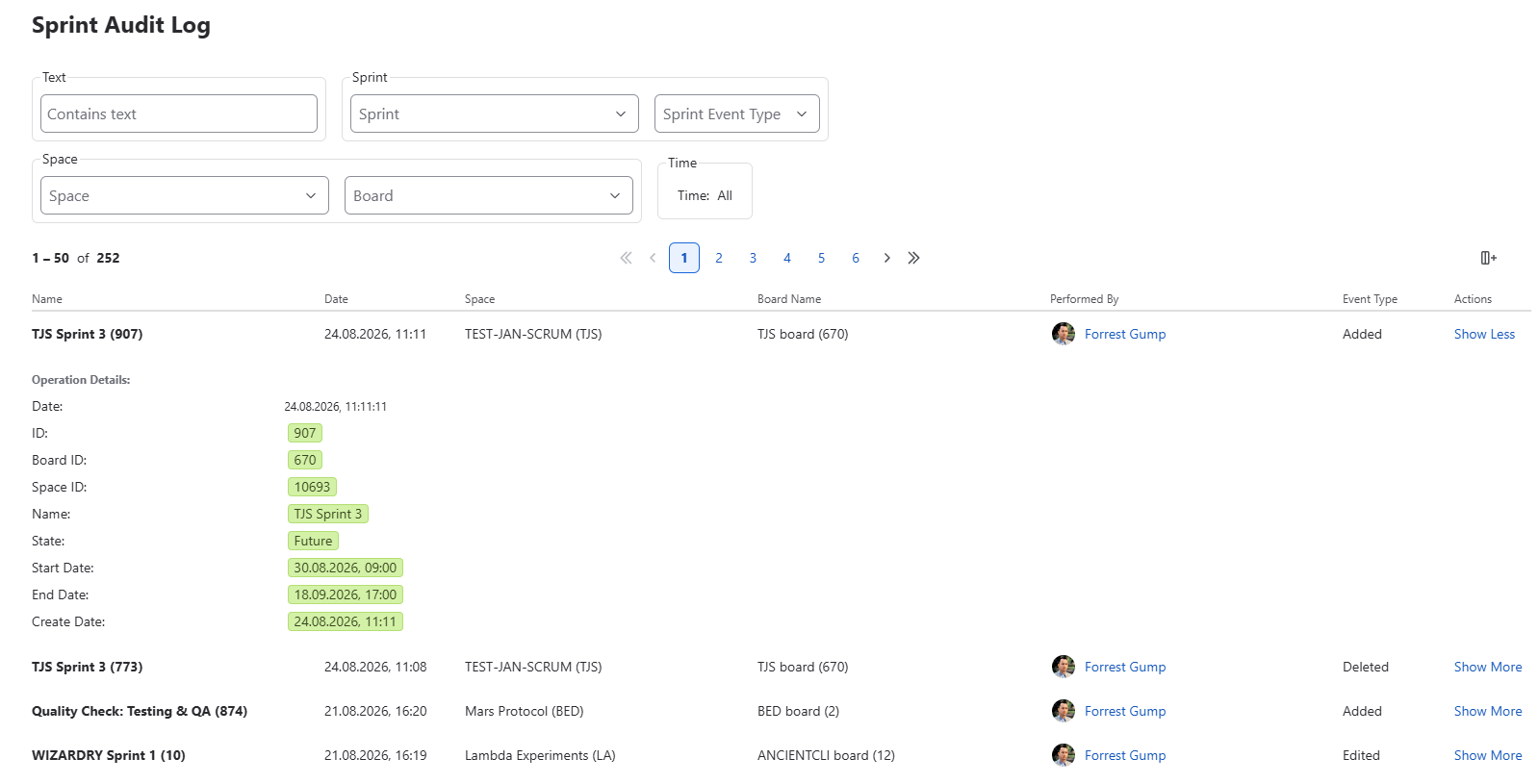 {.img-center .img-large}
Tracked Events
Sprint Organizer records significant events that occur during the sprint lifecycle.
Supported event types include:
Added
A new sprint was created.
Edited
One or more sprint properties were modified, such as:
- Sprint Name
- Sprint Goal
- Start Date
- End Date
Started
A Future sprint was started and became Active.
Closed
An Active sprint was completed and moved to the Closed state.
Deleted
A sprint was removed from Jira.
These events provide a complete operational history of sprint changes, making it easier to understand how sprint configuration has evolved over time.
Audit Entries
Each audit entry represents a single sprint event.
By default, every entry displays:
- Sprint Name
- Event Date
- Performed By
- Event Type
- Actions
Additional columns can be enabled:
- Space
- Board Name
Entries are displayed in chronological order, with the most recent changes appearing first.
Filtering
Sprint Audit Log includes powerful filtering capabilities that help administrators locate specific events.
Text Search
Search audit entries using free text.
Searching for fields Subcategory, User name, Sprint name, Space name, Board name, Space key, Account id, Sprint id and Board id.
Sprint
Display events related to a specific sprint.
Event Type
Filter by one or more lifecycle events:
- Added
- Edited
- Started
- Closed
- Deleted
Space
Limit results to a selected space.
Board
Limit results to a selected board.
Time
Display only events within a selected date range.
Filters can be combined to investigate specific sprint changes across large Jira instances.
Show More
Selecting Show More opens a detailed view of the selected audit event.
Depending on the event type, additional information may include:
- Previous values
- New values
- Modified sprint properties
- Affected dates
- Sprint goal
- Board information
- Additional event metadata
This detailed view is particularly useful when investigating unexpected changes or reviewing historical sprint modifications.
Operational Insights
Sprint Audit Log is designed to support both troubleshooting and governance.
Typical use cases include:
- Identifying who modified a sprint
- Reviewing changes before and after a release
- Investigating unexpected sprint schedule changes
- Auditing deleted sprints
- Validating planning activities across multiple teams
- Understanding how sprint configuration evolved over time
Rather than replacing Jira history, Sprint Audit Log provides a dedicated view focused exclusively on sprint lifecycle events.
Data Retention
Sprint Organizer stores the most recent 500 audit events.
Older events are automatically removed as new ones are recorded.
Events that occurred before Sprint Organizer was installed cannot be reconstructed or displayed.