Bulk Link Operation | Dependency Governance Documentation
Bulk Link Operation documentation.
The Bulk Link Operation allows creating links for multiple work items at once based on filter results.
It enables efficient linking across large sets of work items while maintaining full validation and control.
Purpose
Bulk Link Operation is designed to:
- Link multiple work items in a single operation
- Apply relationships across large datasets
- Reduce repetitive manual linking
- Maintain consistency in work item relationships
Where It Is Available
The operation is available in:
- Work item search (filters view)
It can be accessed via:
- Apps → Bulk Add Link
How It Works
- Open an work item filter or search results
- Select one or more work items (or use all results)
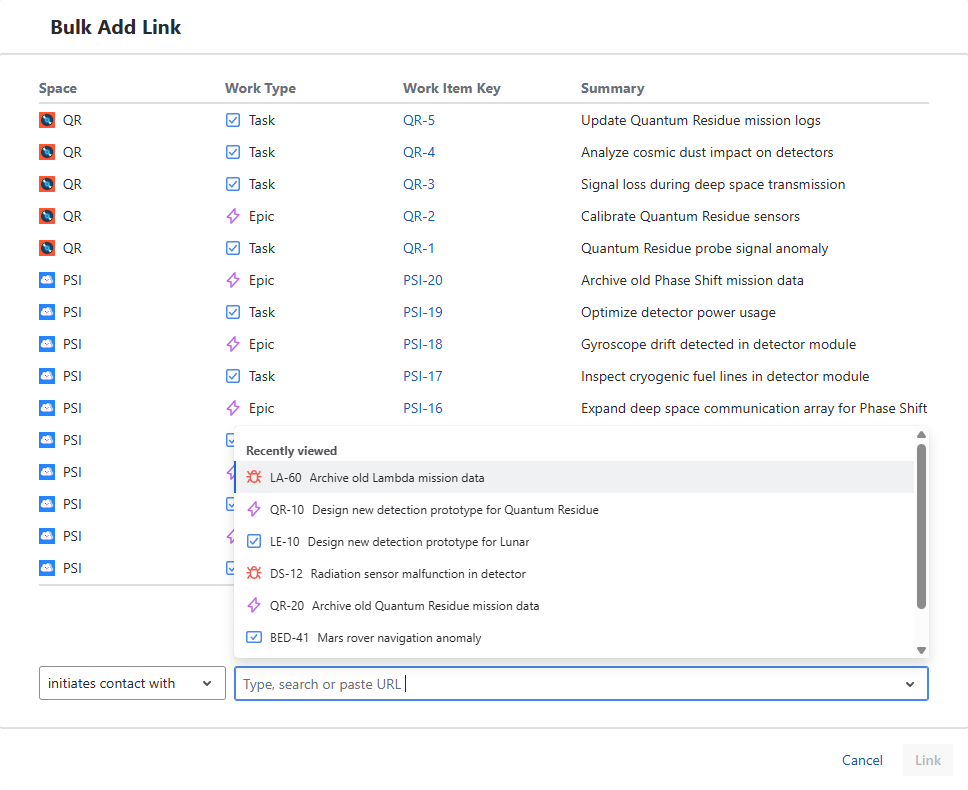
- Open Apps → Bulk Add Link
- A modal dialog is opened
- Select:
- link type
- one or more target work items
- Confirm operation
Selecting Source Work Items
Source work items are:
- All work items returned by the filter
- Selection of subset of work items returned by the filter is not possible
Selecting Target Work Items
You can select one or more work items to link to all source work items.
Methods
- Search by work item key
- Search by summary
- Paste work item key
- Paste work item URL
Behavior
- Supports selecting multiple work items
- Pasting supports a single work item at a time
- All selected targets will be linked to all selected source work items
Link Type Selection
Before creating links, a link type must be selected.
Behavior
- Only allowed link types are available
- Available options depend on:
- source work items
- target work items
Operation Behavior
The operation creates links between:
- each selected source work item
- and each selected target work item
Example
- 10 source work items
- 2 target work items
→ Results in up to 20 links created
Validation Behavior
Each link is validated independently.
Rules
- Source work item must allow the link (outward)
- Target work item must allow the link (inward)
Result
- Valid links are created
- Invalid links are skipped or blocked
UI Behavior
- Only allowed link types are shown
- Feedback is provided after execution
- Operation runs across all selected work items
Limitations
- Does not modify existing links
- Does not remove links
- Requires valid permissions for all involved work items
Permissions
Using Bulk Link Operation requires:
- Permission to view work items
- Permission to create work item links