Link Work Item Action | Dependency Governance Documentation
Link Work Item Action documentation.
The Link Work Item Action provides a dedicated way to create links directly from an work item.
It is available as an work item action and allows linking work items without using the Dependencies Panel.
Purpose
The Link Work Item Action enables:
- Quick linking from the work item view
- Controlled link creation outside the panel
- Consistent linking experience across all Jira entry points
It ensures that all links created through this action follow the same validation rules.
Where It Is Available
The Link Work Item Action is available in all places where work items actions (gear menu) are accessible.
This includes:
- Work Item view
- Work Items lists
- Boards
- Any view supporting work item actions
It can be accessed via:
- Work Item Actions → Link work item
How It Works
- Open an work item
- Select Link Work Item from App Actions
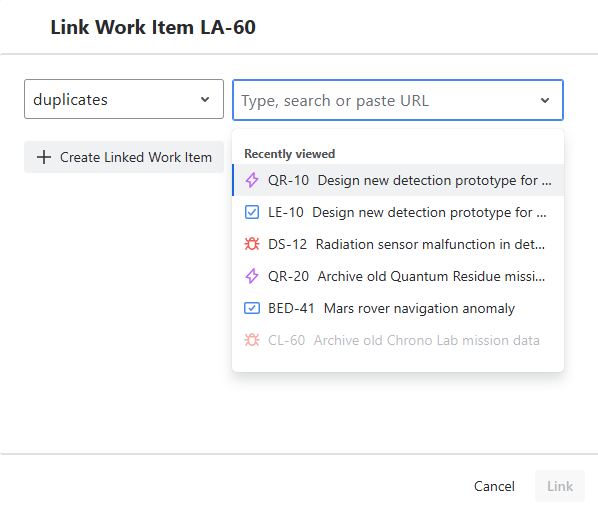
- A modal dialog is opened
- Choose one of the options:
- select existing work items to link
- create a new linked work item
- Confirm action
Link Type Selection
Before creating a link, a link type must be selected.
Behavior
- Only allowed link types are available
- Available options depend on:
- source work item configuration
- destination work item configuration
- Default link type may be preselected
Selecting Target Work Item
You can select one or more work items to link or create a new linked work item.
Behavior
- Supports selecting multiple work items
- Work Items can be added using:
- search by work item key
- search by summary
- paste work item key
- paste work item URL
- Pasting supports a single work item at a time
- Alternatively, a new work item can be created and linked
Create Linked Work Item
Within the modal, you can create a new work item and link it in a single step.
Behavior
- Opens an work item creation form inside the modal
- Allows entering required fields (e.g., work type, summary)
- After creation:
- the work item is created
- the link is created automatically
Validation
- Link type must be allowed for:
- source work item
- newly created work item
- Validation is applied before completion
Notes
- This provides the same capability as the Dependencies Panel
- Allows creating and linking work items without leaving the current context
Validation Behavior
All link creation is validated before execution.
Rules
- Source work item must allow the link (outward)
- Destination work item must allow the link (inward)
Result
- If validation passes → link is created
- If validation fails → operation is blocked
UI Behavior
- Only valid link types are displayed
- Invalid operations are prevented before execution
- Feedback is immediate after action
Consistency with Other Features
The Link Work Item Action uses the same logic as:
- Dependencies Panel
- Bulk Link Operation
This ensures:
- consistent validation
- predictable behavior
- no bypass of rules
Limitations
- Only single link creation is supported
- No bulk operations available
- No modification of existing links
Permissions
Using the Link Work Item Action requires:
- Permission to view work items
- Permission to create work item links