Work Type Field Schemes | Dependency Governance Documentation
Work Type Field Schemes documentation.
Work Type Field Schemes define how Field Schemes are applied to spaces and work types.
They act as a mapping layer between:
- Spaces
- Work Types
- Field Schemes
This configuration determines how linked work items are displayed across different contexts.
Purpose of Work Type Field Schemes
Work Type Field Schemes allow you to:
- Apply field configuration to selected spaces
- Define a Default Field Scheme for all work types
- Override field configuration for specific work types
- Reuse the same configuration across multiple spaces
They ensure that linked work item details remain consistent while still allowing flexibility where needed.
Assignment Model
Work Type Field Scheme
- May be Not Assigned to any space
- May be assigned to One Or More Spaces
Space
- May have No Work Type Field Scheme Assigned
- May have Only One Work Type Field Scheme Assigned
If a space has no scheme assigned:
- Default linked work item presentation is used
Administration View - Table Columns
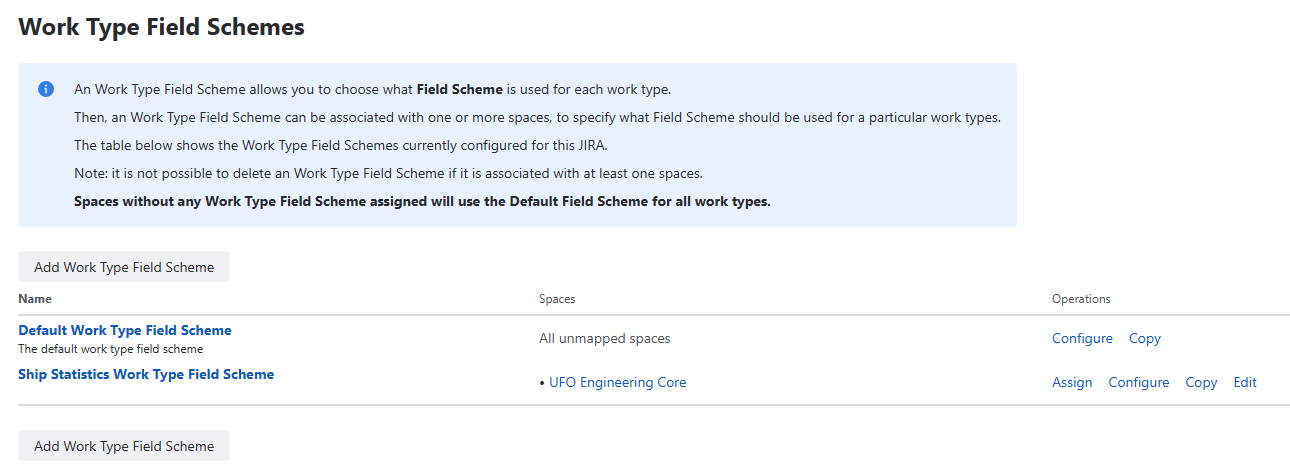
The Work Type Field Schemes section displays a table of all available schemes.
Name
- Displays the name of the scheme
- Clicking the name opens the Configuration View
Spaces
- Displays a list of spaces assigned to the scheme
- Provides visibility into where configuration is active
Operations
Assign
- Opens a space selection view
- Allows assigning the scheme to selected spaces
- Replaces any existing assignment
Configure
- Opens the configuration view
- Allows defining default and work-type-specific Field Schemes
Edit
- Allows editing:
- Name
- Description
Delete
- Opens a confirmation dialog
- Removes the scheme after confirmation
- May be restricted if assigned to spaces
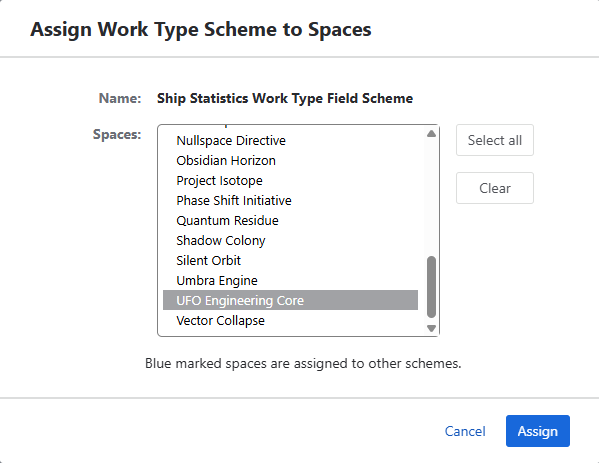
Assigning Scheme to Spaces (Assign Action)
Clicking Assign opens a selection view:
- Displays available spaces
- Allows selecting one or multiple spaces
- After confirmation:
- Scheme is assigned to selected spaces
- Previous assignments are replaced
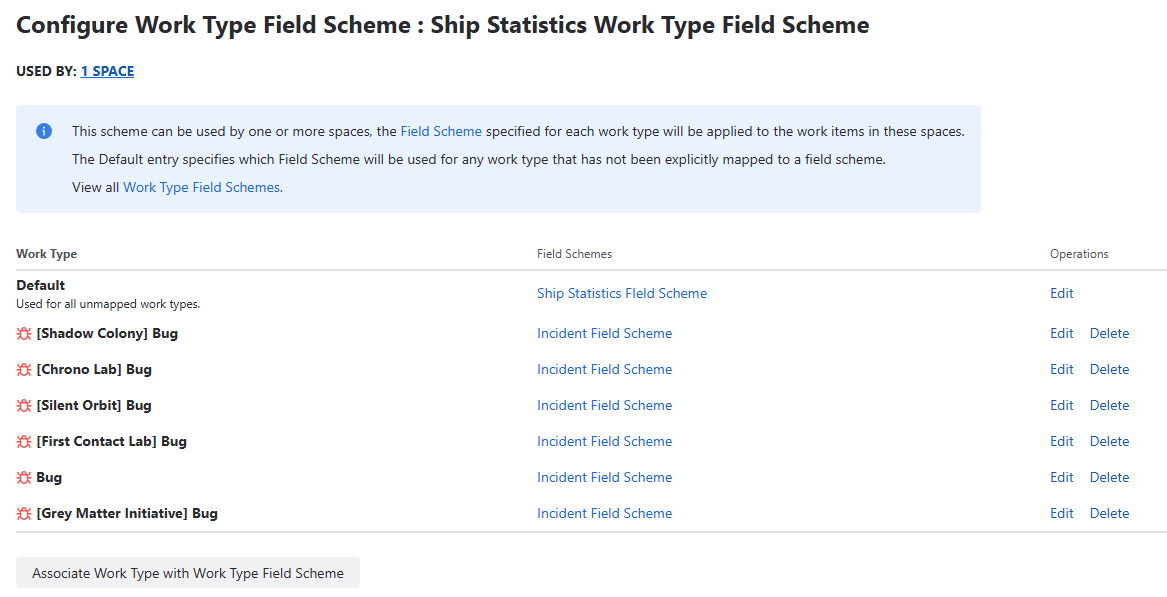
Configuration View
The configuration is presented as a list of mappings.
Each row defines:
- Work Type → Field Scheme
Default Mapping (Required)
At the top of the list, there is always one default entry.
Characteristics
- Always present
- Cannot be removed
- Has a selectable Field Scheme
- Acts as fallback for all work types
Behavior
- Applies to all work types without overrides
- Ensures every work has a resolved Field Scheme
Work Type Mappings
Additional mappings can be added below the default entry.
Each mapping defines:
- Work Type
- Field Scheme
Configuration
- Work Type is selected from available work types
- Field Scheme is selected from existing Field Schemes
- Each Work Type can appear only once
Selection Behavior
- Work Types already used:
- Do not appear in the dropdown
- Prevents duplicate mappings
- Ensures one configuration per work type
Behavior
- If mapping exists → that Field Scheme is used
- If not → default mapping is used
Managing Mappings
Users can:
- Add new mappings
- Change Field Scheme for any mapping
- Remove mappings (except default)
Save Behavior
- All changes require clicking Save
- After saving:
- Configuration is applied immediately
- All assigned spaces follow updated rules
Effective Field Scheme Resolution
For every work item, exactly one Field Scheme is resolved:
- Check if space has an Work Type Field Scheme
- If not → default presentation applies
- If assigned:
- use work-type-specific Field Scheme (if defined)
- otherwise use default Field Scheme
Where It Is Applied
Field Scheme resolution affects:
- Dependencies Panel
It determines:
- visible fields
- field order
- layout
Interaction with Other Features
Work Type Field Schemes control:
- presentation of linked work items
They do not control:
- link validation
- link availability
These are handled by:
- Control Work Item Links
- Link Schemes
- Work Type Link Schemes
UX Notes
- Default mapping is always present and cannot be removed
- Dropdowns exclude already configured work types
- Changes are applied immediately after saving
- No changes are made to existing work items data
Permissions
Managing Work Type Field Schemes requires:
- Jira administrator or space administrator permissions
- Access to Depencency Governance administration