Space Administration | Dependency Governance Documentation
Space Administration documentation.
Space Administration allows managing Depencency Governance configuration at the space level.
It provides visibility into how link rules and field presentation are applied in a specific space and enables controlled adjustments without modifying global settings.
Available Sections
Within Space Administration, the following sections are available:
- Links Configuration
- Fields Configuration
Links Configuration
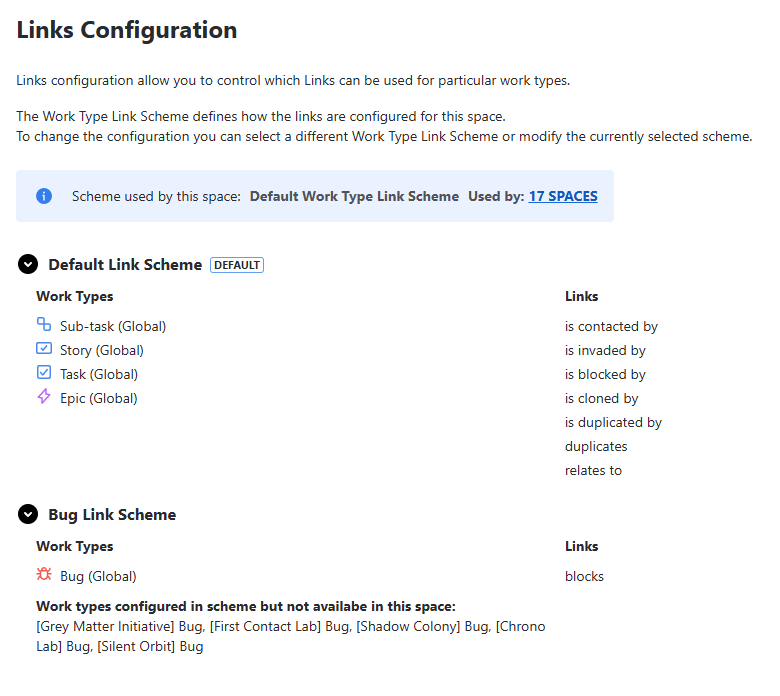
The Links Configuration view shows how work item links are configured for the selected space.
Purpose
This view allows you to:
- Understand which link types are allowed
- See how configuration differs across work types
- Adjust configuration for a specific space
- Override global setup when needed
Configuration Overview
The page displays the currently assigned:
- Work Type Link Scheme
This scheme defines how link rules are applied in the space.
Usage Information
Each scheme includes information about:
- How many spaces it is used in
- Which spaces are using it
This helps assess the impact of configuration changes.
Changing Configuration
You can modify the configuration directly from this view:
- Select a different Work Type Link Scheme
- Clear the selection (no scheme assigned)
Behavior
- If a scheme is selected:
- link control is applied based on the selected configuration
- If no scheme is assigned:
- no link restrictions are enforced in this space
- Changes apply immediately
Fields Configuration
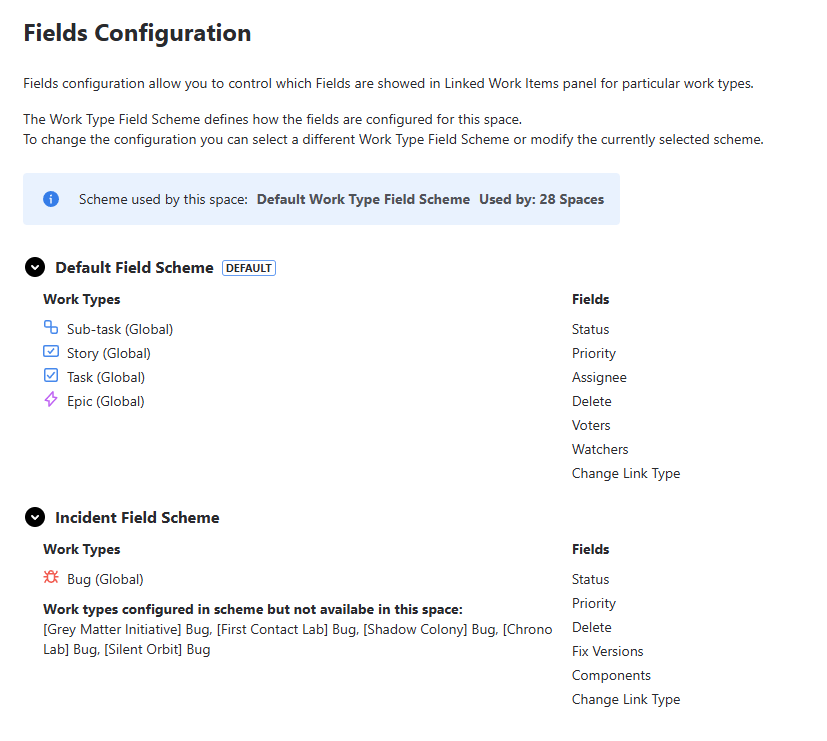
The Fields Configuration view controls how linked work items details are displayed in the Dependencies Panel.
Purpose
This view allows you to:
- Control which fields are shown for linked work items
- Adjust field configuration per work type
- Customize how information is presented in the panel
Configuration Overview
The page displays the currently assigned:
- Work Type Field Scheme
This scheme defines how fields are configured in the space.
Usage Information
Each scheme includes information about:
- How many spaces it is used in
- Which spaces are using it
This helps understand the scope of configuration reuse.
Changing Configuration
You can modify the configuration directly from this view:
- Select a different Work Type Field Scheme
- Clear the selection (no scheme assigned)
Behavior
- If a scheme is selected:
- field configuration is applied to the Dependencies Panel
- If no scheme is assigned:
- default field presentation is used
- Changes apply immediately
Permissions
Access to Space Administration requires:
- Space administrator permissions