Fields Overview | Sprint Organizer Documentation
Fields Overview documentation.
Sprint Organizer extends Jira with additional sprint reporting fields that can be used in JQL, dashboards, filters, automations, and reports.
While Jira's native Sprint field provides only limited querying capabilities, Sprint Organizer synchronizes additional sprint metadata to work item-level custom fields, making it possible to search work items using sprint names, sprint states, goals, dates, boards, and historical sprint participation.
These fields are updated automatically during background synchronization and are available throughout Jira anywhere custom fields can be used.
Sprint Reporting fields support exact value matching.
- Advanced Search (JQL) provides autocomplete suggestions for supported text fields such as Sprint Name, Sprint Goal, Sprint Board, Closed Sprints, and All Sprints
- Basic Search supports only exact value matching for text-based Sprint Reporting fields and does not provide autocomplete suggestions due to current Jira limitations for Forge custom fields
- Text-based Sprint Reporting fields support both the
=andINoperators - Date fields fully support both Advanced Search and Basic Search
{.img-center .img-large}
Search Capabilities
| Field | Advanced Search (JQL) | Basic Search |
|---|---|---|
| Sprint Name | Autocomplete suggestions | Exact match |
| Sprint Goal | Autocomplete suggestions | Exact match |
| Sprint State | Future / Active | Exact match |
| Sprint Board | Autocomplete suggestions | Exact match |
| Closed Sprints | Autocomplete suggestions | Exact match |
| All Sprints | Autocomplete suggestions | Exact match |
| Sprint Start Date | Date operators | Date picker |
| Sprint End Date | Date operators | Date picker |
| Sprint Complete Date | Date operators | Date picker |
All date fields support both Advanced Search (JQL) and Basic Search.
Examples of supported JQL expressions include:
"Sprint Complete Date" < endOfMonth()
Basic Search supports the standard Jira date operators, including:
- Between
- In the last
- More than
- In the range
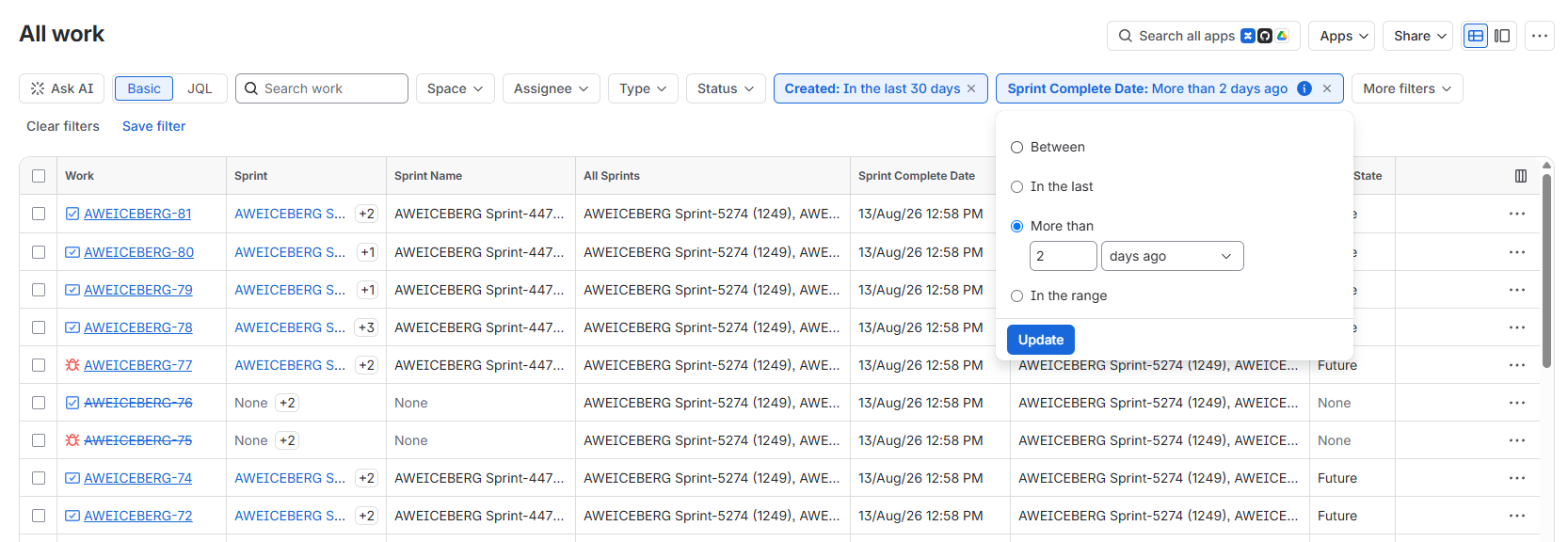
All text-based Sprint Reporting fields support both the = and IN operators.
The IN operator can be used to match multiple values in a single query.
Example
"Closed Sprints" IN ("GW Sprint 1", "ILLUMINA Sprint 1")
Available Fields
Sprint Organizer provides the following custom fields.
Sprint Name
Contains the name of the work item's current Active or Future sprint.
Typical use cases:
- Find work items currently assigned to a specific sprint
- Create sprint-specific dashboards
- Filter work items by sprint name
Example
"Sprint Name" = "Sprint 42"
The field also supports searching by sprint ID.
Example
"Sprint Name" = 42
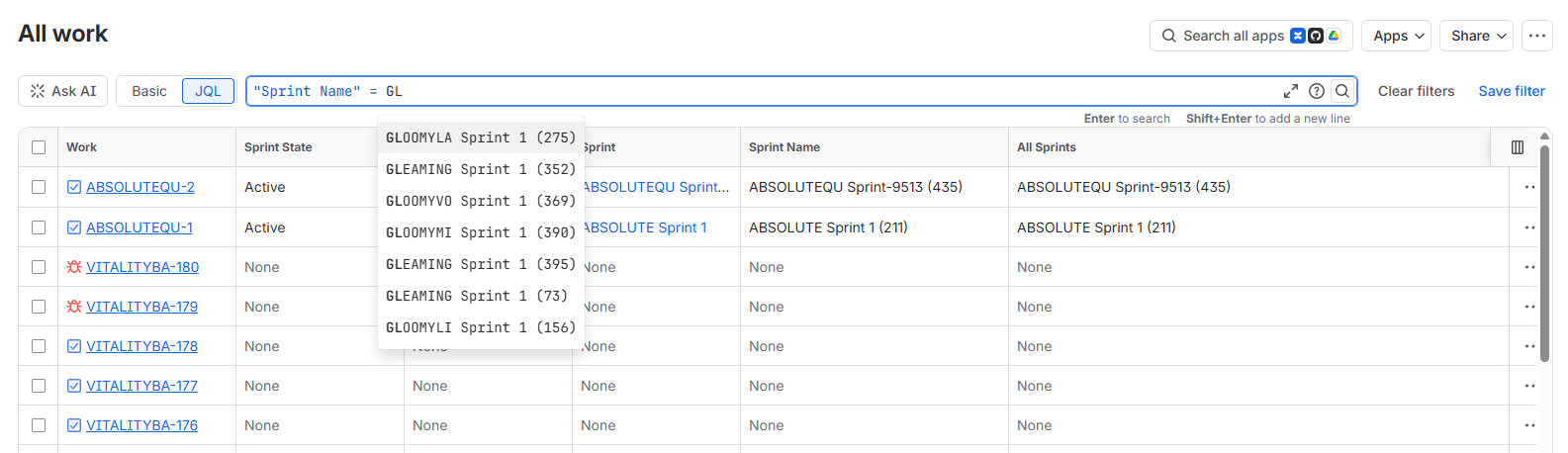
Search suggestions:
 {.img-center .img-large}
Sprint State
Stores the current state of the work item's active or future sprint.
Supported values:
- Active
- Future
Closed sprints are tracked separately using the Closed Sprints field.
Example
"Sprint State" = Active
Sprint Goal
Contains the goal of the current Active or Future sprint.
Useful for reporting or identifying work items belonging to sprints with specific planning objectives.
Example
"Sprint Goal" = "Release 2.0"
Advanced Search provides autocomplete suggestions for available sprint goals.
Basic Search requires entering the exact goal value.
Sprint Start Date
Stores the scheduled start date of the current Active or Future sprint.
Typical use cases:
- Reporting
- Automation
- Date-based filtering
Example
"Sprint Start Date" >= "2026-01-01"
Sprint End Date
Stores the planned end date of the current Active or Future sprint.
This field can be used to locate work items belonging to sprints ending within a selected period.
Example
"Sprint End Date" <= "2026-12-31"
Sprint Complete Date
Contains the actual completion date of a sprint after it has been closed.
Useful for historical reporting and sprint analytics.
Example
"Sprint Complete Date" >= "2026-07-01"
Sprint Board
Stores the name of the Scrum board that originally owns the sprint.
This makes it easy to identify work items belonging to sprints from a specific board.
Example
"Sprint Board" = "Backend Scrum"
The field also supports searching by board ID.
Example
"Sprint Board" = 15
Advanced Search provides autocomplete suggestions for all available Scrum boards.
Basic Search supports exact matching by board name or board ID.
Closed Sprints
Contains all completed sprints the work item has previously belonged to.
Unlike Jira's native Sprint field, this field preserves sprint history after an work item moves into a new sprint.
A maximum of 40 closed sprint entries is stored per work item.
Typical use cases:
- Identify work items completed in a particular sprint
- Review previous sprint participation
- Build release reports
Example
"Closed Sprints" = "Sprint 25"
The field also supports searching by sprint ID.
Example
"Closed Sprints" = 25
Advanced Search provides autocomplete suggestions for all known sprint names.
Basic Search supports exact matching by sprint name or sprint ID.
All Sprints
Contains every sprint the work item has ever been assigned to, including:
- Completed sprints
- The current Active sprint
- Future sprints
This field provides the complete sprint history of an work item.
A maximum of 40 sprint history entries is stored per work item.
Typical use cases:
- Trace work item movement between sprints
- Reporting
- Historical analysis
- Advanced JQL filters
Example
"All Sprints" = "Sprint 12"
The field also supports searching by sprint ID.
Example
"All Sprints" = 12
Advanced Search provides autocomplete suggestions for all known sprint names.
Basic Search supports exact matching by sprint name or sprint ID.
Synchronization
Sprint Reporting fields are synchronized automatically in the background.
Synchronization updates include:
- Sprint name changes
- Sprint goal changes
- Sprint state changes
- Sprint board changes
- Sprint start date changes
- Sprint end date changes
- Sprint completion
- Work item movement between sprints
Because synchronization is asynchronous, changes made in Jira may not be reflected immediately in Sprint Reporting fields.
To learn more about how and when fields are updated, see Field Updates.
Common Use Cases
Sprint Reporting fields enable advanced queries that are difficult or impossible using Jira's native Sprint field.
Examples include:
- Find work items currently planned for a sprint
- Find all work items completed in a specific sprint
- Find work items that have ever belonged to a sprint
- Find wok items assigned to sprints from a specific Scrum board
- Create dashboards grouped by sprint state
- Build automations based on sprint start, end, or completion dates
- Generate reports using complete sprint history
- Search work items by sprint goal
- Filter work items using sprint IDs instead of sprint names
Permissions
Sprint Reporting fields follow Jira's permission model. Users can search and view custom field values only on work items they are already authorized to access.
By default, Sprint Reporting fields do not store Sprint Names or Board Names. Sprint and board IDs are used where applicable.
This is because text-based custom fields cannot dynamically restrict individual values based on the permissions of the user viewing an work item. Storing names could therefore expose Sprint or Board Names that a user would not normally be able to access in Jira.
Administrators can optionally enable storing Sprint Names and Board Names in Sprint Reporting fields from Custom Fields Settings.
When enabled, stored names may include private, inaccessible, or deleted sprints and boards and become available through custom fields, JQL searches, filters, dashboards, reports, and automations.
Enabling these settings affects only the information stored in Sprint Reporting fields. It does not grant access to the underlying Jira sprint, board, space, or work item.
Because enabling these settings may expose names that users would not normally be able to see in Jira, they should only be enabled when appropriate.
To learn more, see Permissions Settings.
Limitations
The following limitations apply to Sprint Reporting fields:
- Text-based Sprint Reporting fields support exact value matching only
- The
~(contains) operator is not supported - Autocomplete suggestions are available only in Advanced Search (JQL)
- Due to current Jira limitations for Forge custom fields, Basic Search does not provide autocomplete suggestions for text-based Sprint Reporting fields
- Synchronization is asynchronous, so recently changed sprint information may not be searchable until the next synchronization cycle
- A maximum of 40 entries is stored per work item in both the Closed Sprints and All Sprints fields